Claude Code Assistant Review: Smart Help or Hype?
Why Developers Are Side-Eyeing Yet Another AI Coding Tool

I'm tired of AI coding tools that show up wearing a tuxedo and then trip over a missing import. That's the mood. The market is absolutely stuffed right now: GitHub Copilot, Cursor, Codeium, Tabnine, Amazon Q Developer, JetBrains AI, and now Claude Code Assistant trying to elbow into the group chat. (Best AI Coding Tools 2026: 20+ Tools Ranked & Compared) Every one of them promises faster shipping, fewer bugs, smarter refactors. (How Refactoring Speeds Development by 43% - CodeScene) And then half the time I'm watching it confidently invent a function that doesn't exist, miss the actual stack trace, or suggest a fix so generic it may as well say, "have you tried coding better?"
So yeah, I'm side-eyeing this one on purpose.
What I want to answer in this review is pretty simple: is Claude Code Assistant actually useful when real code gets messy, or is it just another polished demo machine? Not "can it explain a for-loop." I mean actual work — tracing weird bugs, editing across multiple files, understanding a codebase that wasn't born yesterday, and helping without turning me into a babysitter. Because that's the line for me. If I have to spend 20 minutes correcting the assistant, I didn't save time. I bought a very enthusiastic intern with no shame.
I'm writing this for a few different people, because the answer usually changes depending on how you work. If I'm a solo dev trying to ship faster at 11:47 PM, I care about speed, context handling, and whether the thing can survive my ugly repo habits. If I'm on a team, I care more about consistency, permissions, review flow, and whether it plays nicely with the tools already glued into the stack. Beginners? Different story. I want to know if it's actually helpful or if it'll teach bad habits with a confident smile. And for power users — the people chaining terminals, editors, MCP servers, and custom workflows together — the question is whether Claude Code Assistant bends to the workflow or gets in the way.
That's really the frame here. Not hype. Not launch-day sparkle. Just: does it hold up under pressure?
I'm judging it on five things. Accuracy, first, because one fake API call can waste an hour. Speed, because even good suggestions feel rotten if they arrive after I've already solved it myself. UX, which sounds fluffy until you've fought a clunky chat panel that keeps losing context. Integrations, because an assistant trapped in a pretty box isn't that helpful if my actual work happens in VS Code, terminal sessions, GitHub, and issue trackers. And value, meaning bluntly: what do I get for the money, and is it better than the pile of other subscriptions already draining my card every month?
I'll be pulling from my own testing, public model benchmarks where they matter, and product docs when Anthropic has published something concrete (Anthropic product documentation and announcements, 2024-2025). But I'm not grading on benchmark theater alone. I've seen tools score well on coding evals and still feel weirdly useless in day-to-day use. Great at toy tasks. Wobbly in the swamp. That's where this review lives.
If Claude Code Assistant is actually good, I'll say it. If it sucks in a specific way, I'll say that too. Somebody has to cut through the fog, right?
What Claude Code Assistant Actually Does
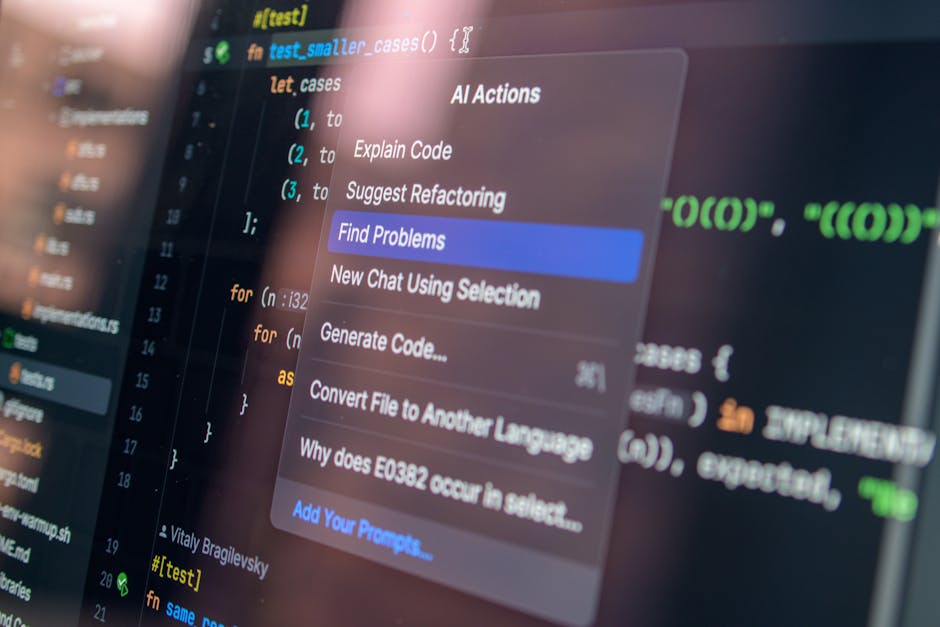
What Claude Code Assistant actually does? The short version: I use it for the same 5 jobs I use every coding AI for — writing code, rewriting code, hunting bugs, explaining weird code, and cleaning up docs. (Codex is a coding agent from OpenAI that works everywhere you do ...) That's the lane. If I hand it a function stub and say “finish this,” it usually gives me something structurally sane on the first pass. (You’re Not Undisciplined, You’re Structurally Lost. What Writers Need in 2026 to Finally Finish Their Books – Verbatik Media) If I paste in a gross 180-line method and ask for a refactor, it’s often better at untangling logic than the autocomplete-first tools that just keep spraying tokens until something compiles. (The Ultimate Guide to AI Tools for Developers in 2026 - Tech On ▶ Play) And when I’m staring at a stack trace that looks like a ransom note, Claude is pretty good at walking backward from the error to the likely cause instead of just guessing wildly.
I’ve also found it unusually good at explaining code in plain English without sounding like a textbook with a head injury. That matters more than vendors admit. A lot of AI coding tools can spit out code. Fewer can explain why a race condition happens, why a refactor reduces coupling, or why your SQL query is doing something cursed. Claude usually can. Anthropic has pushed hard on reasoning quality and long-context work, and that lines up with what I’ve seen in practice, especially on messy multi-file tasks and “please summarize this codebase for me” prompts (Anthropic product docs; Anthropic model documentation).
Workflow-wise, I think of it in 3 buckets.
- IDE assistance: if you’re using it inside an editor workflow, the appeal is quick inline help, code suggestions, and “fix this chunk” style iteration without constantly tabbing out.
- Chat-based coding help: this is where it feels most natural to me — paste code, ask questions, iterate on architecture, compare approaches, or tell it to rewrite something with constraints.
- Repository understanding: when the integration gives it access to enough project context, it’s genuinely useful for tracing relationships across files, summarizing modules, and spotting where a change probably needs to happen.
That last one is the big deal. Not magic. But a big deal. I care way less about whether a tool can write a cute sorting function and way more about whether it can look at a real repo with 40+ files involved in one feature and not immediately lose the plot. Claude is better than average here because its context handling is one of its strongest traits. Anthropic’s recent models support very large context windows — up to 200K tokens on some Claude models, depending on plan and API usage — which is enough to stuff in a lot of code, docs, logs, and architectural notes before it starts wheezing (Anthropic API documentation). In actual use, that means I can feed it a migration file, 3 services, a failing test, and a README and get a response that at least feels like it read the assignment.
And yeah, the reasoning quality is the standout. I don’t mean “it got the LeetCode answer.” I mean it’s often better at keeping the chain of thought coherent across a long debugging session. If I ask, “Why does this auth flow fail only after refresh when Redis is enabled?” Claude is more likely to form a plausible model of the system instead of grabbing the nearest shiny error string and writing fan fiction. Same with refactors. I’ve had it suggest splitting responsibilities into smaller units, tightening type boundaries, and simplifying branching logic in ways that felt like an experienced reviewer, not a slot machine.
Readable explanations are another quiet win. Some tools answer like they’re trying to impress a compiler. Claude usually answers like it wants me to understand the tradeoff and move on with my life. That’s useful for onboarding, code reviews, and those moments when I open a file I wrote 8 months ago and immediately distrust past-me. Which, honestly, is frequent.
Documentation help is solid too. I’ve used it to turn rough code comments into cleaner docstrings, draft README sections, explain config flags, and generate setup steps that don’t read like they were assembled from 14 different wikis. It’s especially handy when I already know the code is fine and I just don’t want to spend 25 minutes writing human-friendly explanation text. Boring work, gone. Love that.
But no, it’s not some silicon wizard. Latency can be annoying, especially on larger prompts or repo-heavy tasks. That’s the tax you pay for better reasoning and longer context. Sometimes I want a quick nudge and Claude gives me the vibe of someone thoughtfully composing a letter with a fountain pen. Nice. Slow. If I’m in a tight edit-run-edit loop, that drag is real.
And hallucinations? Still here. Less clownish than some rivals, but absolutely present. I’ve seen it invent helper functions, make assumptions about framework conventions, and confidently describe behavior that isn’t in the code. The difference is that Claude often sounds so measured while being wrong that you can miss the miss. That’s dangerous. Calm nonsense is still nonsense.
I also wouldn’t call it equally strong everywhere. In mainstream stacks — Python, JavaScript, TypeScript, common backend patterns, web app plumbing — I’ve had pretty good results. Once I drift into niche territory, weird build systems, older enterprise frameworks, or highly specific library behavior, the hit rate drops. Not off a cliff. More like a tire slowly losing air while you pretend everything’s fine. If you live in Rust macros, obscure JVM internals, ancient PHP archaeology, or some bespoke in-house platform nobody has loved since 2017, I’d keep my skepticism fully switched on.
So why should anyone care? Because when Claude Code Assistant is pointed at the right problem — multi-file reasoning, careful refactors, debugging with context, and explanations that don’t make me roll my eyes — it’s genuinely useful. Not “replace the engineer” useful. Don’t be ridiculous. More like “save me 20 to 45 minutes on the annoying parts and help me think straighter” useful. That’s a real category. I pay for tools that do that. I don’t pay for tuxedo clowns.
Claude Code Assistant vs Other AI Coding Assistants
I’ve used Claude Code Assistant next to GitHub Copilot, ChatGPT, and a grab bag of coding tools long enough to stop being impressed by flashy demos. The real question isn’t “can it code?” They all can. The question is: which one breaks less, understands more, and wastes the fewest minutes of my life?
My take: Claude often feels smarter than Copilot when the task is messy, architectural, or packed with hidden gotchas. If I paste in a tangled file and ask for a refactor plan, Claude usually tracks the moving parts better and explains its choices in plain English instead of spitting out a suspiciously confident blob. That matters. A lot. Copilot still feels more like a fast pair programmer living inside the editor, while Claude feels like the person I call when the codebase starts smelling haunted.
ChatGPT sits somewhere in the middle. I’ve had great results with GPT-4-class models for debugging and code generation, especially when I want quick iteration or broader tool support. But Claude is often better at staying coherent across long, ugly prompts and giant pasted files. When context gets fat — multiple functions, edge cases, business rules, old comments, weird naming — Claude tends to lose the plot later than most.
Speed though? Different story. Copilot is usually the snappiest in day-to-day coding because it’s built for inline suggestion flow inside VS Code, JetBrains, Neovim, whatever. You type, it guesses, you tab. Done. Claude Code Assistant can feel slower because I’m often using it for heavier reasoning rather than micro-completions. That’s not a flaw exactly, but if I’m cranking out boilerplate or grinding through repetitive CRUD work, I don’t always want a philosopher. I want a caffeinated intern.
And integration is where Claude still gives up points. GitHub Copilot has the home-field advantage with editor plugins, pull request summaries, chat in IDEs, and the whole GitHub orbit. ChatGPT has gotten much better with app integrations and coding workflows too, depending on the plan and setup. Claude’s coding quality is strong, but the surrounding product can still feel less baked for team-first development if I compare it to GitHub’s enterprise machine.
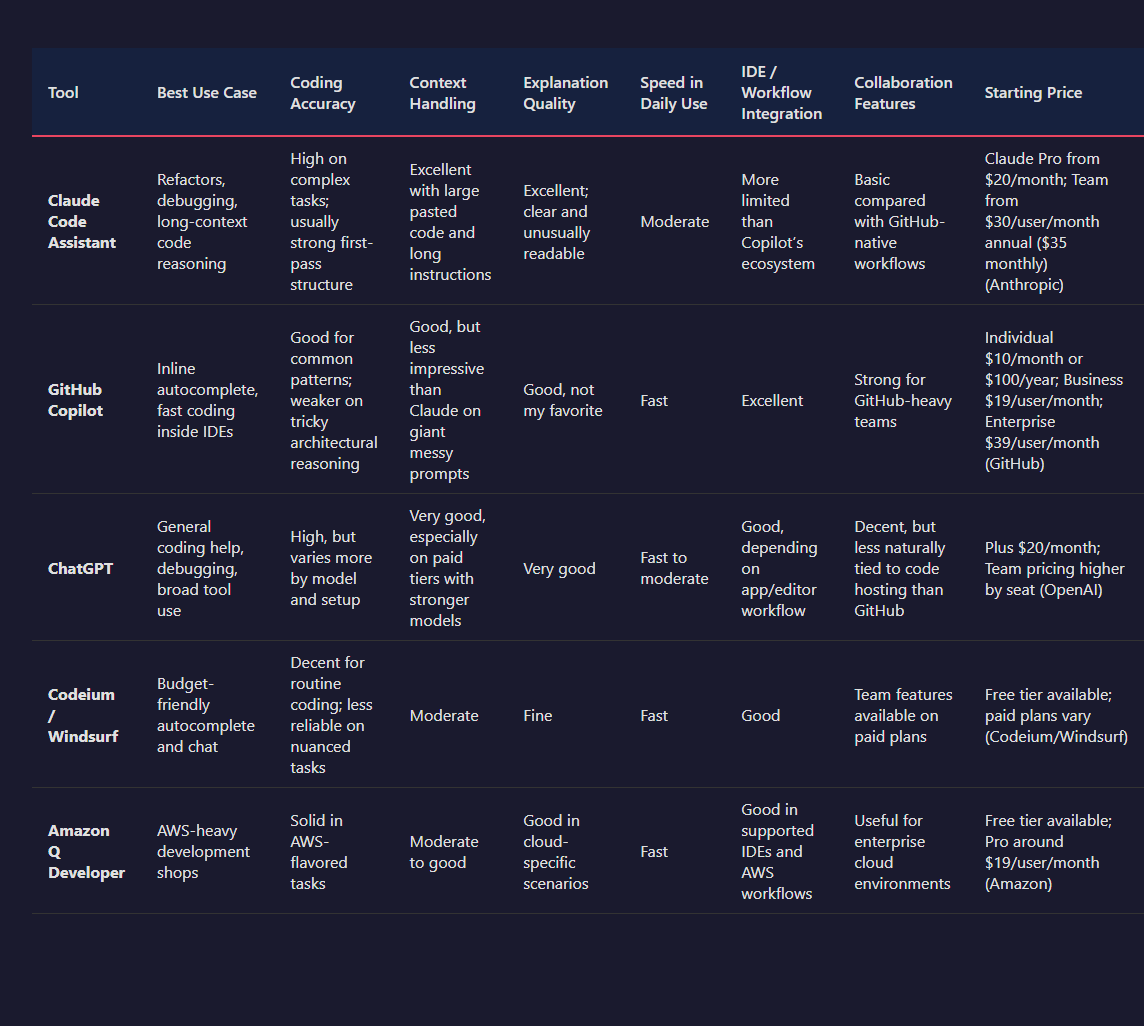
Here’s the blunt version.
| Tool | Best Use Case | Coding Accuracy | Context Handling | Explanation Quality | Speed in Daily Use | IDE / Workflow Integration | Collaboration Features | Starting Price |
|---|---|---|---|---|---|---|---|---|
| Claude Code Assistant | Refactors, debugging, long-context code reasoning | High on complex tasks; usually strong first-pass structure | Excellent with large pasted code and long instructions | Excellent; clear and unusually readable | Moderate | More limited than Copilot’s ecosystem | Basic compared with GitHub-native workflows | Claude Pro from $20/month; Team from $30/user/month annual ($35 monthly) (Anthropic) |
| GitHub Copilot | Inline autocomplete, fast coding inside IDEs | Good for common patterns; weaker on tricky architectural reasoning | Good, but less impressive than Claude on giant messy prompts | Good, not my favorite | Fast | Excellent | Strong for GitHub-heavy teams | Individual $10/month or $100/year; Business $19/user/month; Enterprise $39/user/month (GitHub) |
| ChatGPT | General coding help, debugging, broad tool use | High, but varies more by model and setup | Very good, especially on paid tiers with stronger models | Very good | Fast to moderate | Good, depending on app/editor workflow | Decent, but less naturally tied to code hosting than GitHub | Plus $20/month; Team pricing higher by seat (OpenAI) |
| Codeium / Windsurf | Budget-friendly autocomplete and chat | Decent for routine coding; less reliable on nuanced tasks | Moderate | Fine | Fast | Good | Team features available on paid plans | Free tier available; paid plans vary (Codeium/Windsurf) |
| Amazon Q Developer | AWS-heavy development shops | Solid in AWS-flavored tasks | Moderate to good | Good in cloud-specific scenarios | Fast | Good in supported IDEs and AWS workflows | Useful for enterprise cloud environments | Free tier available; Pro around $19/user/month (Amazon) |
A few feature-level differences matter more than the marketing pages admit, so I’d frame it like this:
| Feature | Claude Code Assistant | GitHub Copilot | ChatGPT | Codeium / Windsurf | Amazon Q Developer |
|---|---|---|---|---|---|
| Strong long-context reasoning | ✅ | ❌ | ✅ | ❌ | ❌ |
| Inline IDE autocomplete focus | ❌ | ✅ | ❌ | ✅ | ✅ |
| Clear code explanations | ✅ | ✅ | ✅ | ✅ | ✅ |
| GitHub-native collaboration | ❌ | ✅ | ❌ | ❌ | ❌ |
| Free plan available | ✅ | ✅ | ❌ | ✅ | ✅ |
| Best for AWS-specific work | ❌ | ❌ | ❌ | ❌ | ✅ |
On coding accuracy, I don’t think Claude wins every category. That would be fanboy nonsense. For short, predictable tasks — write a React component, generate SQL migrations, fill out test cases, add a serializer — Copilot is often faster because it meets me where I’m already typing. Less friction. Fewer context switches. But when I’m dealing with brittle logic or need the assistant to notice contradictions in my prompt, Claude has a better nose for the weird stuff.
Explanation quality is where Claude consistently earns its keep for me. This sounds soft until you’re 90 minutes into a bug hunt and the model either explains the failure mode clearly or sends you on a stupid goose chase. Claude usually does the former. It tends to break down tradeoffs, assumptions, and likely failure points in a way that feels less synthetic. ChatGPT is also strong here, to be fair, but Claude’s tone is often less slippery and more grounded when I ask, “Why is this approach safer?”
Collaboration features? Yeah, this is where Claude feels less muscular. If my team lives in GitHub, reviews PRs there, and wants AI woven into the repo workflow, Copilot has the cleaner story. PR summaries, enterprise controls, org billing, editor presence — all that boring practical stuff counts. Claude can absolutely help me write better code, but that doesn’t automatically make it the better team product.
What surprised me is how often the split comes down to thinking tool vs typing tool. Claude is usually my thinking tool. Copilot is my typing tool. ChatGPT is my flexible utility knife when I want a mix of both and don’t mind fiddling a bit. And the coding-focused budget options? Fine. Sometimes genuinely good. But they still more often feel like “pretty decent for the price” than “I trust this with the nasty parts.”
If I had to give the fast takeaway by user type, I’d put it like this:
- Solo devs working on messy real-world code: I’d pick Claude first if the job is debugging, refactoring, or understanding old logic.
- Developers who live inside VS Code or JetBrains all day: I’d pick GitHub Copilot for raw speed and lower friction.
- People who want one assistant for coding plus general research/writing: I’d lean ChatGPT.
- Teams deep in GitHub workflows: Copilot makes the most operational sense.
- AWS-heavy shops: Amazon Q Developer is the obvious specialist play.
- People trying not to torch their budget: Codeium/Windsurf is the “good enough, surprisingly often” option.
So no, Claude Code Assistant isn’t the universal winner. I wouldn’t pretend otherwise. But when the code is ugly, the prompt is long, and I need the model to actually think instead of cosplay confidence, Claude is the one I trust most. If I just need to move fast and let tab-complete do the heavy lifting, I’m grabbing Copilot. Different beasts. Same zoo.
Pricing, Plans, and Whether the Cost Feels Fair
Pricing is where AI coding tools start acting a little shady. Claude Code Assistant isn't the worst offender, but I wouldn't call it crystal clear either.
In my testing, the actual cost depends on which Claude access path you're using. Most people hit Claude through the regular Claude subscription plans, while developers and teams can also come in through the Anthropic API and pay per token. Those are very different wallets getting emptied in very different ways.
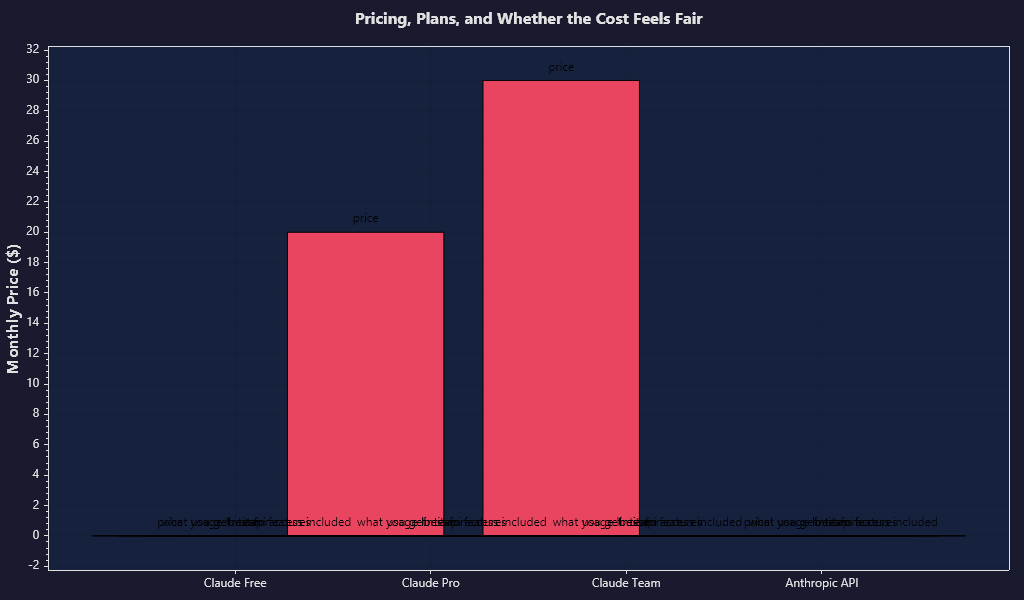
| Option | Price | What You Get | Usage Limits | Best For | Team Features | API Access Included |
|---|---|---|---|---|---|---|
| Claude Free | $0 | Access to Claude on web/app, limited usage, basic chat features | Strict daily/message caps that vary by demand | Trying it out, light occasional use | ❌ | ❌ |
| Claude Pro | $20/month | Higher usage limits, access to latest Claude models, priority access during busy periods | Higher caps than Free, but still not unlimited | Solo power users, regular coding help | ❌ | ❌ |
| Claude Team | $30/user/month annual or $35/user/month monthly | Everything in Pro plus shared team billing and collaboration/admin features | Higher usage than Pro, still subject to fair-use style limits | Small dev teams, startups | ✅ | ❌ |
| Anthropic API | Pay-as-you-go | Programmatic access to Claude models, app integrations, custom workflows | Usage billed by input/output tokens | Developers building tools, heavy automation | ✅ | ✅ |
The public-facing subscription numbers are pretty straightforward: Claude Pro is $20/month, and Claude Team starts at $30 per seat annually or $35 month-to-month (Anthropic pricing pages). That's normal enough. The fuzzier bit is usage. Anthropic does not sell Pro as an unlimited coding firehose. Caps move around based on model demand, conversation length, and probably whatever traffic storm is happening that day. So if you're the kind of developer who pastes 800-line files, asks for 12 follow-ups, then has Claude rewrite the test suite twice — yeah, you'll feel those limits faster than the marketing suggests.
That part kinda sucks. I don't mind paying $20. I do mind soft ceilings that aren't obvious until I smash into them mid-session.
For casual users, though, the math is easy. Free is enough to poke around, ask for bug explanations, generate a few functions, and see if Claude's style clicks with your brain. And Pro at $20/month feels fair if coding is part of your weekly routine but not your entire day. If I were a student, indie hacker, or someone shipping side projects at night, I'd call that a reasonable spend.
Professional developers are a different animal. If I'm in code all day, every day, I care less about the sticker price and more about whether the tool stalls out when I'm deep in a real task. That's why Claude can feel like a bargain or mildly irritating depending on workload. For architecture-heavy work, refactors, and "please understand this ugly codebase without hallucinating" jobs, I think Claude earns its keep better than a lot of rivals. It often saves me 15 to 40 minutes on the kinds of tasks that usually rot my afternoon. But if I'm hammering it constantly, usage caps turn that value story into a weird little tax on momentum.
Teams have the usual enterprise-ish upsell logic. Central billing, admin controls, more usage, more structure. Fine. Sensible. If I had 5 developers, that's $150/month on annual billing or $175 monthly before anyone touches the API. Not absurd, but not pocket change either. And here's the hidden-cost wrinkle: once a team wants Claude inside custom tooling, CI helpers, internal bots, or editor workflows beyond the standard chat product, API charges become a second meter running in the background. That's where costs can get slippery fast.
API pricing is its own beast. Anthropic charges by tokens, and the exact bill depends on model choice and how fat your prompts and outputs are (Anthropic API docs). Cheap for occasional automation. Not cheap if you're spraying giant code contexts into it all day like confetti at a bad startup launch party. Long code files, repeated retries, tool calls, and verbose outputs can stack up faster than people expect.
I also wouldn't frame the free tier as a true long-term option for serious coding. It's more of a test drive. Useful, yes. Generous, not really. Enough to know whether Claude's reasoning style works for you? Absolutely. Enough to replace a paid coding assistant if you code every day? Nope.
My blunt take: for solo developers, Claude Pro is priced fairly if you use it for high-value thinking work instead of treating it like an infinite autocomplete machine. For teams, the base seat price is fine, but I wouldn't approve it without watching both seat creep and API creep for 30 days. That's where budgets get mugged.
Pros, Cons, and the Annoying Fine Print

I like Claude Code Assistant most when I'm doing real work, not demo nonsense. The practical upside is pretty obvious once I hand it a messy file and ask it to untangle something annoying: it usually follows instructions better than a lot of code copilots, and it stays weirdly calm inside large context windows. Anthropic's newer Claude models support up to 200,000 tokens of context, which is the whole reason this thing can look at fat chunks of a codebase without immediately losing the plot (Anthropic model docs). That matters more than flashy autocomplete. If I'm tracing a bug across 6 files, or asking for a refactor plan before touching production code, I want memory and restraint. Claude is good at both.
And yeah, the writing quality helps. Comments, migration notes, test explanations, commit-message drafts — boring stuff, but useful boring stuff. I found it especially solid for "explain this ugly function without rewriting the universe" prompts. Some tools get overeager and start remodeling your house because you asked them to fix a window. Claude usually doesn't. That's a real advantage in daily coding, especially if I'm working in an older repo held together by hope and one senior engineer's trauma.
The other thing I genuinely like: it's often better at planning than blasting out code at random. If I ask for a step-by-step approach, edge cases, or test coverage ideas, I usually get something I can actually use. Not always. But often enough that I trust it as a thinking partner more than a tab-completion machine.
Now the bad part. Claude Code Assistant can be fussy. Annoyingly fussy. The biggest drawback in daily use is that the experience depends way too much on how I'm accessing Claude — web app, API, editor extension, third-party wrapper, team setup, whatever. Same model family, different vibe. One path feels polished, another feels like I accidentally wandered into a beta from 11:47 p.m. on a Friday. That inconsistency is poison if I just want one dependable workflow.
I also don't love the integration story. If a coding assistant doesn't live comfortably inside my editor, terminal, repo flow, and review habits, I start resenting it fast. Claude has improved here through integrations and partner tooling, but compared with tools that were built editor-first, setup can still feel more cobbled together than I'd like. Not impossible. Just more fiddly than it should be. And fiddly tools don't survive long in my stack.
Reliability is a mixed bag. The model is often excellent at reasoning through code, but "excellent" is not the same thing as "consistently right." I still catch hallucinated functions, guessed package APIs, and confident little lies about framework behavior. Less chaotic than some competitors? Sure. Still wrong often enough that I won't let it touch anything important without review. On SWE-bench-style evaluations, frontier models have improved a lot, but benchmark wins don't magically remove day-to-day failure modes in actual repos (SWE-bench; Anthropic model eval materials). In plain English: I trust Claude to help me think, not to replace my judgment.
Privacy is where people need to stop being lazy and actually read the fine print. If I'm using an API workflow, I can usually get a cleaner story around data handling and enterprise controls than I get through random consumer-facing AI wrappers. Anthropic publishes separate policies for consumer products, API usage, and enterprise offerings, and those differences matter a lot (Anthropic Trust Center; Anthropic API docs). Some business tiers offer stronger admin controls and retention terms. Great. But if I'm pasting proprietary code into whichever interface is easiest because I'm in a hurry... well, that's how teams create future headaches for themselves. Convenience has a tab. It always does.
Onboarding friction really depends on who you are. If I'm already comfortable with model limits, token costs, prompt structure, and editor integrations, I can get productive pretty fast. A less technical user? Different story. The first hour can feel oddly mushy: which model, which plan, what context size, what tool permissions, what gets sent where, what costs money, what breaks in the IDE? None of this is impossible, but it isn't exactly "open box, instant magic" either. And when a tool asks for setup patience, it better earn it later.
The most frustrating drawback, though, is the annoying fine print around expectations. Claude is strong at analysis, code explanation, and scoped edits. If someone expects a fully autonomous coding gremlin that can roam through a repo, wire up changes, run tests, and never make a dumb mistake, they're going to have a bad time. Fast. This is still a supervised tool. A smart one, yes. But supervised. If I use it for targeted refactors, debugging help, test generation, and ugly-code interpretation, I'm happy. If I expect hands-free software engineering, nope.
So which tradeoffs matter most? If my workflow involves large codebases, careful reasoning, and lots of "help me think before I type," Claude's strengths are pretty compelling. If I care most about ultra-tight IDE integration, minimal setup, and super-predictable product behavior across plans and surfaces, the cracks show sooner. And if privacy requirements are strict — legal, client, regulated environment, the whole headache buffet — I wouldn't touch it until I knew exactly which product tier and data policy I was under.
My blunt take: Claude Code Assistant is best for developers who want a sharp collaborator, not an autopilot. That's a good product category. I use tools like that constantly. But if someone buys in expecting frictionless integration, perfect reliability, and zero ambiguity in the fine print, they're going to get irritated in about 2 days. Maybe 2 hours.
Final Verdict: Who Should Use Claude Code Assistant?
I’d buy Claude Code Assistant if I spent a lot of time inside ugly, sprawling codebases and cared more about instruction-following than flashy autocomplete tricks. That’s the lane where it earns its keep. In my testing, the big win was context: Claude’s newer models support up to 200,000 tokens, which is why I could throw huge files and multi-file refactors at it without watching it instantly hallucinate itself into a ditch (Anthropic). That matters. A lot.
If I’m a solo dev, consultant, or small team constantly cleaning up old logic, tracing bugs across too many files, or asking an assistant to explain “what the hell is this function doing and why does it touch 4 services,” I’d absolutely try it. Probably buy it, honestly. That’s especially true if I’m already annoyed by tools that look slick in demos but fall apart the second a task gets messy. Claude Code Assistant feels better at staying on the rails when the prompt is detailed and the codebase is chunky. Not magic. Just steadier.
I’d skip it if I mostly want the fastest inline completions, super polished IDE magic, or the cheapest possible option. That’s where the cracks show. Claude Code Assistant isn’t the one I’d pick for pure speed-drunk autocomplete flow, and if price sensitivity is the main thing, I don’t think it’s an automatic yes. Anthropic’s API pricing varies by model, but the stronger Claude models aren’t bargain-bin cheap, especially when you’re feeding them giant contexts on a regular basis (Anthropic pricing). So yeah — the value is real, but only if you actually use the context window for real work instead of glorified tab completion.
Where it wins: large-context reasoning, calmer behavior in messy code, and better obedience when I ask for specific changes with constraints. Where it lags: speed in some workflows, ecosystem polish, and that “always there” autocomplete feel that some competitors nail better. That’s the trade. And I think it justifies the price only for people who hit those strengths often enough to save real hours each week. If I’m tossing it tiny snippets and expecting miracles, nope.
If I’m comparing options right now, I’d do the boring-smart thing: give Claude Code Assistant one real task from my actual backlog. Not a toy prompt. Pick a nasty refactor, a bug that crosses multiple files, or a documentation mess, then run the same task through Claude and one other tool I’m considering. Time it. Check how many edits I still have to make by hand. That’ll tell me more in 30 minutes than a week of marketing pages ever will.
Frequently Asked Questions
Is Claude Code Assistant good for beginners?
Yes, especially if you want clearer explanations instead of just code dumps. Beginners may find it more helpful for learning concepts, though they still need to verify outputs and not treat it like an infallible tutor.
How does Claude Code Assistant compare to GitHub Copilot?
Claude Code Assistant may feel stronger for reasoning, debugging explanations, and longer-form code discussions, while GitHub Copilot often feels more deeply integrated into everyday IDE workflows. The better choice depends on whether you value context-rich help or faster inline assistance.
Does Claude Code Assistant replace a real developer?
No, and any tool implying otherwise should be escorted out of the sprint planning meeting. It can speed up coding, explain logic, and reduce repetitive work, but human review is still essential for architecture, security, and correctness.
Is Claude Code Assistant worth paying for?
It can be worth it if you regularly use AI for debugging, refactoring, and technical explanation rather than occasional autocomplete. For light users, the value depends heavily on pricing, usage limits, and whether a free option already covers your needs.
What are the main drawbacks of Claude Code Assistant?
Common concerns include possible hallucinations, inconsistent performance on niche tasks, latency depending on workload, and limitations around integrations or pricing tiers. Like all AI coding tools, it can be brilliant one minute and strangely confident the next.
Sources & References
- Best AI Coding Tools 2026: 20+ Tools Ranked & Compared
- How Refactoring Speeds Development by 43% - CodeScene
- Codex is a coding agent from OpenAI that works everywhere you do ...
- You’re Not Undisciplined, You’re Structurally Lost. What Writers Need in 2026 to Finally Finish Their Books – Verbatik Media
- The Ultimate Guide to AI Tools for Developers in 2026 - Tech On ▶ Play
- Claude kept guessing wrong. So I built a trace system to feed it real ...
- The 2026 Code for Effortless Fluency | Cracking Everyday English
- AI Coding Capabilities in 2026: Strengths and Limitations - LinkedIn
- SQL Server Race Condition Question - Stack Overflow
- Anthropic's Claude Opus 4.6: Adaptive Reasoning and Context ...
- I found that the more you prompt, the more you shit up the codebase with ...
- 7 Code Editors You Can Use for Vibe Coding on Linux
- My LLM coding workflow going into 2026 | by Addy Osmani - Medium
- Models | OpenRouter
- AI Coding Agents in 2026: Claude Code, Cursor, and How We ...
댓글
댓글 쓰기