Claude Review: Is This AI Actually Worth Using?
Can Claude Really Beat the Hype?

Can Claude actually beat the hype, or is this just another AI tool getting inflated by Reddit threads, X screenshots, and people posting cherry-picked genius moments? That's the question I had going in. Because I've seen this movie already. A model drops, people call it "insanely good," a few weeks pass, and then the weird edges start showing up — missed facts, slow replies, oddly stiff writing, random refusals, pricing that makes me wince. So I'm not coming at Claude like a fanboy. I'm coming at it like someone who's burned through way too many AI subscriptions and got tired of paying premium money for polished demos.
This review is for a few specific people. If I'm a writer trying to get cleaner drafts instead of bloated robot sludge, Claude is interesting. If I'm a researcher comparing summaries, source handling, and whether a model quietly invents nonsense, also relevant. If I'm on a team and care about collaboration, file handling, and whether people can actually use the thing without a 20-minute explanation, yep. And if I'm a power user cross-shopping Claude against ChatGPT, Gemini, and whatever shiny new model launched this week, that's really the lane here. I'm not judging it on vibes. I'm judging it on whether it earns a spot in a real workflow.
And yeah, I'm skeptical on purpose. Hype is cheap. I want receipts.
What I tested comes down to six things. First: accuracy. Does Claude get facts right, or does it say wrong stuff in a confident, silky voice? Second: writing quality. Not just grammar — cadence, clarity, whether it sounds human-ish or like a corporate intern trapped in a chatbot. Third: reasoning. Can it follow multi-step instructions, compare tradeoffs, and stay coherent when the prompt gets thorny? Fourth: speed. I don't need instant magic, but I also don't want to watch dots blink like it's 2009. Fifth: usability. Interface, file uploads, project organization, context handling, all the boring stuff that suddenly matters a lot when I use a tool daily. Sixth: value. If I'm paying around $20/month for Claude Pro in many markets, I need a real reason to keep it over alternatives, not just a vague feeling that it's "smart" (Anthropic pricing page). (Is Claude Pro Worth $20? Free vs Pro vs Max (2026) - YouTube)
I also care about something people weirdly skip: consistency. One brilliant answer means almost nothing. I want to know what happens on prompt number 17, when the task is messy, the instructions are annoying, and I need an answer I can use without babysitting it. In my testing, that's usually where the cracks show. Or where a tool earns my respect.
So no, this isn't a fan review. I'm not here to crown Claude the king of AI because it wrote one pretty paragraph or handled one giant PDF without exploding. I'm testing whether it actually holds up for real work — writing, analysis, research, team use, heavy prompting — and where it flat-out falls short. Because if I'm going to spend hours inside a chatbot, I want the truth, not the marketing perfume.
What Claude Is and Who It’s Best For
I found Claude easiest to describe as the “reads a lot, stays calm, writes pretty clean” chatbot in the market. It sits in the same ring as ChatGPT and Gemini, obviously, but the vibe is different. Claude has leaned hard into long context, document-heavy work, and less chaotic writing output. Anthropic’s latest Claude 3 family — Haiku, Sonnet, and Opus — pushed it from “interesting alternative” into real contender territory, especially for people who spend half their day inside PDFs, specs, research notes, contracts, or giant messy drafts (Anthropic, 2024). (Anthropic introduces Claude 3: Haiku, Sonnet, and Opus | Mashable)
And yeah, that matters. Because most people don’t actually need an AI that can make a cute image or crack jokes for 20 minutes. They need something that can take 40 pages of sludge and tell them what the hell is going on.
In my testing, Claude’s core use cases are pretty obvious fast: drafting, summarizing, brainstorming, coding help, and document analysis. (Claude Skills for Knowledge Extraction & Report Writing - Medium) Drafting is one of its better tricks. I’ve gotten cleaner first drafts from Claude than from a lot of competing models, especially for emails, outlines, product docs, and “make this sound human, not corporate oatmeal” rewrites. (Execution is no longer the edge in AI era | Nifemi Aluko posted on ...) Summarizing is where it really earns its keep. Long meeting transcripts, research PDFs, legal-ish docs, support logs — Claude usually keeps the thread without collapsing everything into bland mush. ([PDF] 2026 USDA Explanatory Notes) That’s not rare exactly, but Claude does it with less flailing than a lot of tools.
Brainstorming? Pretty solid. Not always dazzling, but useful. I like it most when I give it constraints. “Give me 12 angles for this landing page, but make 4 of them weird and 3 of them aimed at skeptical buyers.” Stuff like that. If I’m too vague, Claude can drift into polished-but-safe territory. Pleasant. Sensible. A little beige. So if someone wants wild creative swings, I wouldn’t pretend Claude is some fever-dream idea machine. It’s more like a sharp collaborator than an unhinged ad creative on espresso.
Coding help is a mixed bag, and I don’t want to oversell it. Claude can be very good at explaining code, refactoring chunks, spotting logic issues, and working through files with a lot of context. That’s the big win. When a task depends on understanding a large codebase or multiple related files, Claude often feels less lost than smaller models. Anthropic has also pitched Claude heavily toward coding and tool use, and benchmark results for Claude 3.5 Sonnet were strong enough to get attention from developers for exactly that reason (Anthropic, 2024). But “good at coding help” is not the same as “ship whatever it says to production.” I still catch invented functions, sloppy assumptions, and occasional confidence that isn’t earned. Normal AI stuff. Still annoying.
Document analysis is where I think Claude actually has a distinct reason to exist. This is the use case where I stop rolling my eyes at the hype. If someone regularly works with dense source material — policy docs, contracts, academic papers, PRDs, financial reports, interview transcripts — Claude makes immediate sense. Anthropic has emphasized large context windows, with Claude models supporting up to 200K tokens in many cases, which is roughly hundreds of pages depending on formatting (Anthropic documentation). That doesn’t mean every single token gets handled with magical perfection. Nope. Long-context performance always gets fuzzier near the edges. But being able to dump in a huge pile of material and ask grounded questions is legitimately useful.
Who’s it best for? I’d split it three ways.
- Professionals who read and write for a living: analysts, marketers, consultants, founders, lawyers, researchers, PMs. If your job is “absorb information, produce clearer information,” Claude is a very natural fit.
- People dealing with large documents or messy knowledge work: this is the sweet spot. Claude shines most when the task is bigger than a quick one-off prompt.
- Teams that want a safer-feeling writing and analysis assistant: especially if they care about tone consistency, document review, and internal knowledge tasks more than flashy consumer features.
Casual users can still use it, sure. But I think Claude is often overkill for someone who just wants random everyday chatbot stuff — quick trivia, light brainstorming, social captions, dumb fun, maybe the occasional travel plan. If that’s the whole job, there are cheaper or more versatile tools out there. I wouldn’t pay premium money just to ask a bot what to cook with 2 eggs and spinach. That’s like buying a nice mechanical keyboard to type “lol” once a day.
On the flip side, Claude can be underpowered for users who want a giant all-in-one AI playground. If someone cares a lot about image generation, broad third-party integrations, voice features, live web-heavy workflows, or a sprawling app ecosystem, Claude can feel narrower than competitors. That’s the trade. It’s focused. Sometimes that focus feels smart. Sometimes it feels like missing furniture.
So is Claude better for casual users, professionals, or teams? I’d say professionals first, teams second, casual users third. For solo knowledge workers, it makes immediate sense. For teams, it gets interesting when the work revolves around documents, internal writing, analysis, and shared context. For casual users, it’s good — just not always the tool I’d shove to the front of the shelf. If someone’s workload is mostly “help me think, help me write, help me understand this mountain of text,” Claude is easy to recommend. If they want an AI toy box? I’d keep shopping.
That’s really the thing. Claude isn’t trying to be the loudest bot in the room. I found it more useful than exciting. And honestly, for work, that’s usually the better deal.
Claude Features Tested in Real-World Use
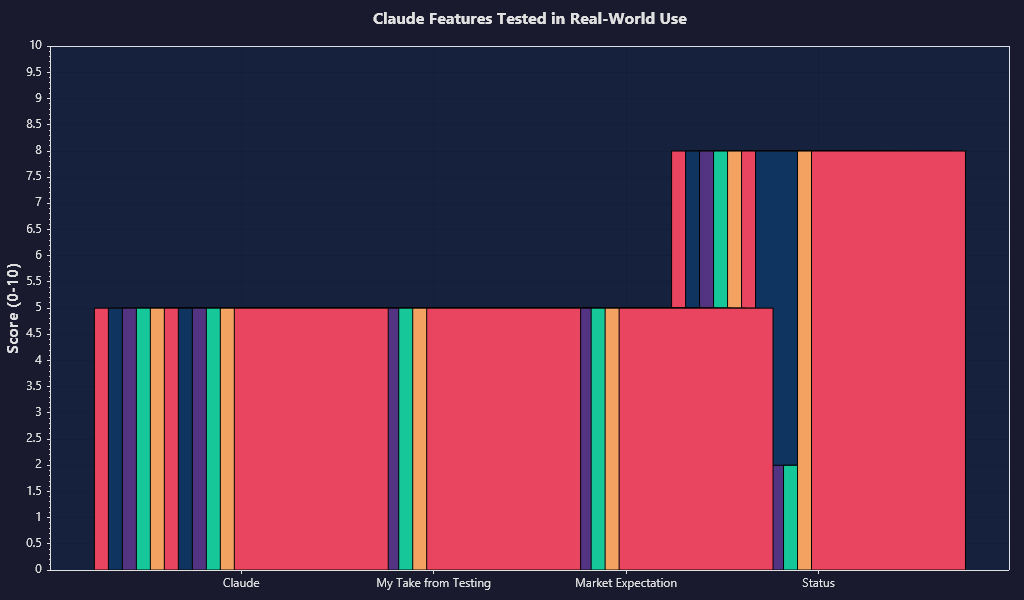
I tested Claude the way I actually use AI tools: ugly real docs, messy prompts, half-baked specs, tone-sensitive writing, and coding tasks that break the moment a model starts bluffing. And Claude’s personality shows up fast. It’s usually calmer than ChatGPT, less jittery than Gemini, and weirdly good at not turning every answer into corporate oatmeal. That matters more than benchmark chest-thumping, honestly.
The big headline is still context. Anthropic has advertised a 200K token context window for Claude 3.5 Sonnet and Claude 3 Opus in many product surfaces, which translates to roughly 150,000+ words depending on formatting and tokenization (Anthropic docs). In my testing, that wasn’t just marketing confetti. I could dump long policy docs, product requirement docs, transcripts, and multi-file notes into Claude and get answers that actually referenced the right section instead of vaguely waving at the document like it had “totally read it.” Not perfect. But unusually solid.
Chat quality first, because if that part sucks, nothing else saves it. Claude is one of the best models I’ve used for thoughtful back-and-forth conversation when I want something measured instead of hyperactive. It doesn’t feel as eager to please in the most annoying way. Less “Absolutely! Here’s an amazing 12-step framework you never asked for.” More “here’s the thing, and here’s where it gets messy.” I like that. A lot.
Where it wins is consistency of voice. If I ask for something restrained, dry, skeptical, or polished-but-human, Claude usually holds the tone for multiple turns better than most competitors. That sounds small until you’re 8 prompts deep editing a landing page, investor memo, or support response pack and the model suddenly starts talking like a TED Talk intern. Claude does that less. In writing workflows, that alone saved me time.
But it’s not magic. Sometimes Claude gets a little too careful. The output can flatten out when I want edge, humor, or sharper persuasion. It’s like working with a very bright person who occasionally overcorrects into “safe and tasteful” when the assignment needed teeth. If I’m writing homepage copy or punchy social posts, I often have to push it harder than I do with ChatGPT. For nuanced essays, summaries, documentation, and professional writing, though? Very strong.
Long-context handling is where Claude earns its rent. I tested it with giant research dumps, legal-ish policy documents, product specs, call transcripts, and mixed source material spread across uploads plus prompt instructions. Claude was unusually good at pulling together threads from different parts of the material without instantly losing the plot. I’ve seen other models pretend they read 80 pages when they clearly skimmed 8. Claude still misses details sometimes, sure, but the hit rate felt meaningfully higher.
And yes, file uploads matter here. Claude’s upload flow is simple enough that I didn’t have to babysit it. PDFs, docs, pasted text, screenshots — decent support, no drama most of the time. The practical win is that I could ask Claude to compare documents, extract contradictions, summarize sections for different audiences, or rewrite source material without doing a bunch of manual prep first. That’s the kind of feature people call boring right before it saves them 45 minutes.
The friction points are mostly workflow stuff. Claude’s interface is clean, maybe a little too bare-bones depending on what you expect. I like minimalism when it helps. I don’t like it when it means extra clicking, weaker organization, or fewer power-user controls than I want. Compared with ChatGPT’s broader tool stack and ecosystem sprawl, Claude can feel narrower. Cleaner, yes. Also narrower.
That shows up in missing extras. If I’m expecting a giant marketplace of tools, deep multimodal weirdness, memory that feels more persistent, or a kitchen-sink product with voice, image generation, browsing variants, custom GPT-style wrappers, and endless toggles... Claude isn’t trying to be that. Sometimes that restraint is refreshing. Sometimes it just means I hit a wall and switch tabs.
For instruction-following, Claude is mostly excellent. I found it especially good at obeying formatting constraints, preserving requested structure, and not wandering off into unsolicited advice. If I say “give me 5 bullets, under 12 words each, no intro,” Claude usually nails it. That shouldn’t be impressive in 2026, but here we are. Models still freelancing on simple instructions like they’re paid by the paragraph.
Tone retention is one of Claude’s sneaky best features. I could feed it a sample and say “stay in this register, keep the sentence rhythm, don’t get salesy,” and it would usually keep the vibe intact across revisions. That’s hard. Lots of models can imitate surface-level style for one answer. Keeping it stable over several turns without drifting into mush? Different story. Claude did better than I expected.
Reasoning is good, but I wouldn’t oversell it into mythology. On structured analysis, tradeoff breakdowns, summarization with judgment, and “read this messy thing and tell me what matters,” Claude is very capable. On more brittle logic chains or technical edge cases, I still verify aggressively. Always. If a model sounds smooth while being wrong, that’s worse than clunky honesty. Claude is generally less chaotic than some rivals, but it still hallucinated enough in my tests that I wouldn’t trust it blind on legal, financial, or implementation-critical work.
Coding support is similar: competent, sometimes excellent, occasionally slippery. Claude has been genuinely useful for refactoring, explaining unfamiliar code, generating utilities, writing SQL, reviewing diffs, and turning rough product ideas into working prototypes. It’s especially good at reading larger chunks of code or project context without immediately collapsing into nonsense. That part impressed me. But if I’m debugging something subtle or asking for framework-specific correctness under pressure, I still treat it like a fast junior assistant, not an oracle. Because it isn’t one.
One thing I keep coming back to: Claude feels built for people who read and write all day. Docs. Notes. Memos. Research. Specs. Drafts. If that’s your life, it clicks fast. If you want a flashy Swiss Army knife that does 14 other tricks, Claude can feel restrained to the point of annoyance. Depends what kind of mess you’re trying to clean up.
| Feature / Area | Claude | My Take from Testing | Market Expectation | Status |
|---|---|---|---|---|
| Chat quality | Claude 3.5 Sonnet / Claude 3 Opus | Calm, coherent, less fluff-heavy than many rivals; strong for serious work and iterative discussion | Top-tier conversational quality with fewer random detours | ✅ |
| Long-context handling | Up to 200K context window in supported Claude models (Anthropic docs) | One of Claude’s clearest strengths; handled long PDFs, transcripts, and specs better than most tools I tested | Should reliably reference large source material | ✅ |
| File uploads | Documents and files supported in Claude interface | Useful and straightforward; good for summarization, comparison, extraction, and rewrite tasks | Baseline feature for premium AI assistants now | ✅ |
| Writing assistance | Strong drafting, rewriting, summarization, tone control | Excellent for clean prose and tone retention; sometimes too cautious for punchier marketing copy | Should adapt style without sounding fake | ✅ |
| Instruction following | Usually accurate on format, constraints, and structure | Better than average in my testing; less likely to ignore explicit prompt rules | Should follow exact output requirements | ✅ |
| Reasoning | Strong general reasoning, analysis, and summarization | Good on messy real-world analysis; still needs verification for high-stakes accuracy | Expected to reduce hallucinations and keep logic tight | ✅ |
| Coding support | Code generation, explanation, refactoring, debugging help | Very usable for prototypes and code reading; not reliable enough to trust blindly on tricky bugs | Should handle dev assistance beyond toy snippets | ✅ |
| Persistent memory | Limited compared with broader market expectations | I noticed less of the “assistant remembers my workflow” feeling than I wanted | Users increasingly expect stronger cross-chat memory | ❌ |
| Broader multimodal/tool ecosystem | More restrained product scope than some competitors | Cleaner experience, but fewer extras if I want an all-in-one AI workspace | Market is moving toward stacked tools in one interface | ❌ |
| Claude Pro pricing | $20/month in the US (Anthropic pricing) | Fair if you actually use the context window and writing workflow strengths; less compelling if you want every possible AI feature in one place | Competitive with ChatGPT Plus at $20/month | ✅ |
| API model pricing | Claude 3.5 Sonnet: $3 / million input tokens, $15 / million output tokens; Claude 3 Haiku: $0.25 / million input, $1.25 / million output; Claude 3 Opus: $15 / million input, $75 / million output (Anthropic pricing) | Sonnet is the practical sweet spot; Opus gets expensive fast | Pricing should map cleanly to real performance gains | ✅ |
If I boil it down: Claude is great when the job is “read all this, think clearly, write like a sane adult.” That lane is real, and Claude is near the front of it. The weak spots are mostly around product breadth and those moments where I want more boldness, more tooling, or more persistent workflow memory. So yeah, I’d recommend it — but very specifically. Not because it does everything. Because it does a few important things unusually well.
How Claude Compares With Other AI Chatbots
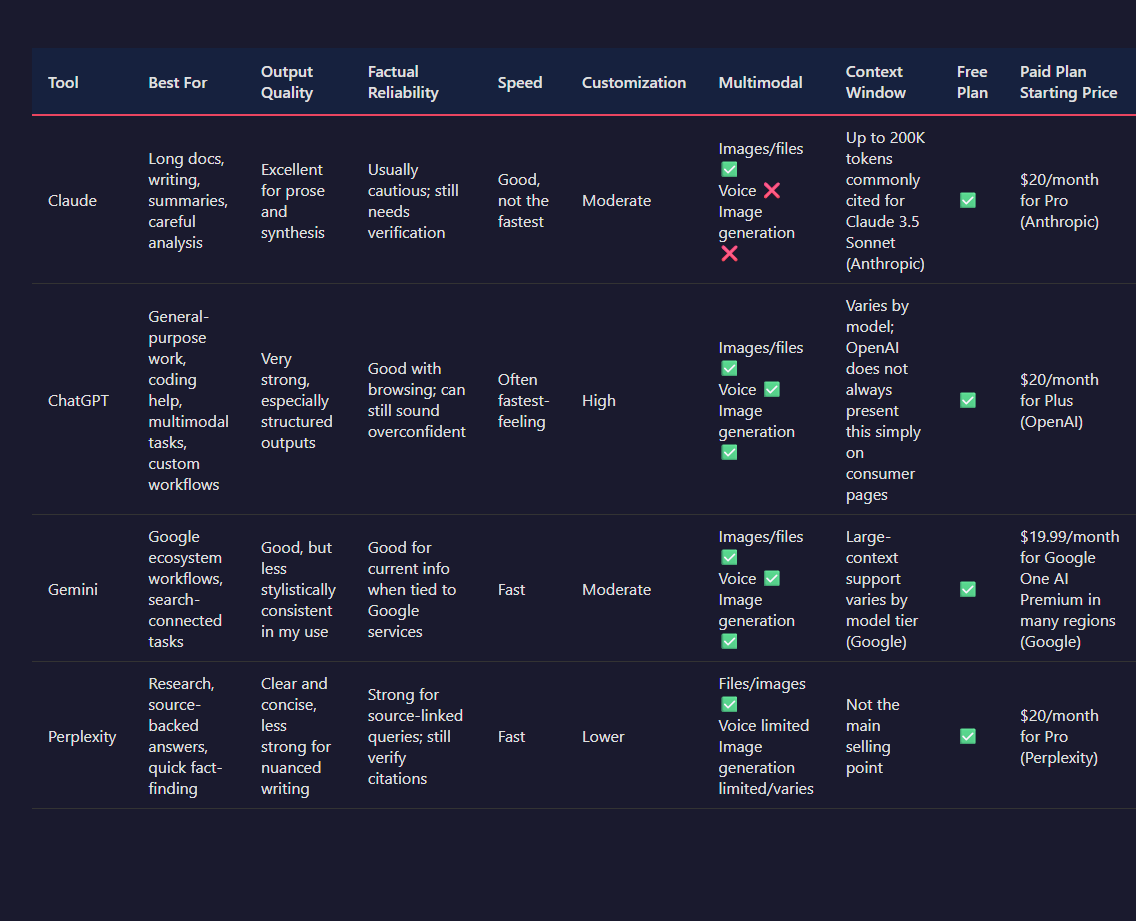
I wouldn't pick Claude as the universal winner. I don't think that tool exists. What I found instead is a bunch of annoyingly specific tradeoffs, and your daily work decides which ones matter.
For writing-heavy work, long documents, and prompts where I need the model to stay sane for 20 turns instead of turning into a caffeinated intern, I keep reaching for Claude. For live web lookups, snappier back-and-forth, and a bigger bag of integrations, ChatGPT usually has the edge. Gemini sits in a weird middle zone for me: sometimes brilliant with Google ecosystem stuff, sometimes oddly slippery when I want consistent style or careful reasoning. That's the short version. The messy version is more useful.
Output quality: Claude is usually the better writer, but not always the better finisher
In my testing, Claude writes like it has actually read human sentences before. That's not a joke. It tends to produce cleaner prose, better summaries, and fewer of those padded "here are 7 strategic considerations" answers that make me want to close the tab. If I'm rewriting a founder memo, drafting a sensitive email, or asking for a clearer product spec from a chaotic brain dump, Claude often gives me the least embarrassing first draft.
ChatGPT, though, is often better at turning vague intent into a polished final artifact fast. Especially if I need structure: a table, a formatted plan, a synthetic spreadsheet formula explanation, a code stub plus next steps. It's more eager. Sometimes too eager. But that eagerness can save time when I already know roughly what I want and just need the machine to sprint.
Gemini can be sharp, especially when I ask it to work across Google Docs-ish material or summarize current-ish topics paired with search. But stylistically? I still find it less dependable. One answer lands. The next one sounds like a safety team and a marketing team fought over the keyboard.
A practical example: I gave Claude, ChatGPT, and Gemini the same ugly 4,800-word product requirements doc and asked each to produce a launch brief for sales, a changelog entry, and a customer-facing FAQ. Claude gave me the best sales brief by a mile — clearer tone, fewer invented details, stronger sense of audience. ChatGPT produced the cleanest FAQ structure. Gemini was fastest at pulling out broad themes, but I had to edit more for tone drift and occasional weird wording. That's the pattern I keep seeing.
Factual reliability: Claude bluffs less, but nobody gets a halo
This is where people get lazy and say one model is "more accurate." I don't buy that as a blanket claim. The real question is: when the model doesn't know, what kind of mistake does it make?
Claude is pretty good at sounding uncertain when uncertainty is the correct move. I like that. It often hedges instead of fabricating, which is exactly what I want in legal-adjacent summaries, policy notes, or technical explanations where one fake citation can poison the whole thing. Anthropic has leaned hard into this style, and it shows up in actual use.
But. If I need current facts, Claude's reliability drops unless the plan includes live web access. And even then, I still verify. Always. ChatGPT tends to be stronger for current-event queries and fast factual lookups because of its browsing tools and wider product plumbing. Gemini also benefits from Google's search stack here, and I notice that advantage most on fresh news, public company info, and "what changed this week?" questions.
For static knowledge tasks, I trust Claude slightly more behaviorally because it seems less likely to bulldoze ahead with fake confidence. That's different from saying it's always more correct. It's more like: when things get fuzzy, Claude is less likely to cosplay certainty. Huge difference.
Speed: ChatGPT usually feels quicker, Claude feels steadier
Claude isn't painfully slow, but I don't think speed is its strongest selling point. In short prompts, ChatGPT often feels more responsive in that first-token, conversational way. Gemini can also feel very quick, especially on lightweight summaries and search-tied prompts.
Claude's tradeoff is that it often stays coherent on giant inputs where other tools start wobbling. So yeah, if I'm tossing in a massive transcript, a legal draft, or 100+ pages of notes, I care less about shaving off 3 seconds and more about whether the output holds together. That's where Claude earns its keep.
And honestly, some people overweight speed. If a model replies in 4 seconds with nonsense, congrats, I guess?
Customization and workflow fit: ChatGPT is more flexible, Claude is more opinionated
If I want a tool that bends itself around my workflow, ChatGPT still wins for me. Custom GPTs, broader tool support, memory features in some plans, deeper ecosystem integrations, and generally more knobs to turn — it's just a more configurable product. OpenAI has built the busier workshop.
Claude feels narrower, but cleaner. Projects and artifacts are genuinely useful, and I like the calmer interaction style. I can drop in reference material, keep a working thread focused, and get outputs that don't immediately mutate into jargon soup. For solo work — writing, planning, coding explanations, document analysis — that simplicity is often a feature, not a missing feature.
Gemini makes the strongest case if your life already lives inside Google Workspace. Gmail, Docs, Drive, Meet notes — that's the obvious lane. If your workflow is "find stuff in Google, summarize it, turn it into something presentable," Gemini can feel convenient in a very practical, unglamorous way.
Still, if you want the most tweakable setup, Claude isn't my first pick. It's more "here's a thoughtful assistant" than "here's a configurable AI operating system."
Multimodal: Claude is capable, but rivals still push further
Claude can handle files and images, and in my testing it's solid with PDFs, screenshots, charts, and document-heavy analysis. That's a real strength. I especially like it for "read this giant PDF and tell me what actually matters" work. Less sparkle. More substance.
ChatGPT still feels broader multimodally. Voice is more mature, image generation is native in a way many people actually use, and the whole package feels more built out for mixed-media tasks. If I want to talk to the model, generate images, inspect a screenshot, and bounce into a web lookup in one session, ChatGPT is usually the easier pick.
Gemini deserves credit here too. Its multimodal story is ambitious, and Google's model family has been strong on image and video-adjacent understanding. But product consistency matters. If the experience feels fragmented, I don't care how pretty the demo was.
Where Claude clearly wins
- Long-context document work: Claude's context window has been advertised at 200K tokens for Claude 3.5 Sonnet and related models, and Anthropic has also introduced higher-context options in some cases (Anthropic). In practice, I find it unusually good at keeping track of big messy source material.
- Tone-sensitive writing: Claude is one of the few models I trust with drafts that need restraint, nuance, or a human-ish voice without endless prompt babysitting.
- Lower-bluff behavior: Not perfect. Never perfect. But it more often signals uncertainty instead of inventing a shiny lie.
- Document analysis: PDFs, policy docs, research notes, transcripts — this is Claude's happy place.
Where rivals still have the advantage
- ChatGPT: better overall product surface area, more customization, stronger multimodal breadth, more mature voice experience, and usually faster-feeling interaction (OpenAI pricing/product pages).
- Gemini: tighter fit with Google services, useful search-connected workflows, and strong utility for people already buried in Docs, Gmail, and Drive (Google One AI Premium / Gemini product pages).
- Perplexity: if the task is "research this with sources right now," I still think Perplexity is often the cleaner answer than any general chatbot pretending to be a search engine.
| Tool | Best For | Output Quality | Factual Reliability | Speed | Customization | Multimodal | Context Window | Free Plan | Paid Plan Starting Price |
|---|---|---|---|---|---|---|---|---|---|
| Claude | Long docs, writing, summaries, careful analysis | Excellent for prose and synthesis | Usually cautious; still needs verification | Good, not the fastest | Moderate | Images/files ✅ Voice ❌ Image generation ❌ |
Up to 200K tokens commonly cited for Claude 3.5 Sonnet (Anthropic) | ✅ | $20/month for Pro (Anthropic) |
| ChatGPT | General-purpose work, coding help, multimodal tasks, custom workflows | Very strong, especially structured outputs | Good with browsing; can still sound overconfident | Often fastest-feeling | High | Images/files ✅ Voice ✅ Image generation ✅ |
Varies by model; OpenAI does not always present this simply on consumer pages | ✅ | $20/month for Plus (OpenAI) |
| Gemini | Google ecosystem workflows, search-connected tasks | Good, but less stylistically consistent in my use | Good for current info when tied to Google services | Fast | Moderate | Images/files ✅ Voice ✅ Image generation ✅ |
Large-context support varies by model tier (Google) | ✅ | $19.99/month for Google One AI Premium in many regions (Google) |
| Perplexity | Research, source-backed answers, quick fact-finding | Clear and concise, less strong for nuanced writing | Strong for source-linked queries; still verify citations | Fast | Lower | Files/images ✅ Voice limited Image generation limited/varies |
Not the main selling point | ✅ | $20/month for Pro (Perplexity) |
So who should use what?
I think Claude fits people who spend half their day inside text: researchers, writers, consultants, PMs, founders, lawyers, analysts, anyone drowning in documents and trying to extract signal without getting fed synthetic sludge. If your pain is "I have too much material and I need a model that stays thoughtful," Claude makes a very strong case.
I'd pick ChatGPT if I wanted the broadest all-around tool. One subscription, lots of capabilities, more ways to shape behavior, stronger multimodal range, and a product that keeps sprouting new features every other week. Messier? Sure. But also more capable in a bunch of practical workflows.
And if your entire digital life runs through Google, Gemini might be the least annoying choice. That's not a glamorous endorsement. It's a real one.
My honest take: Claude is the tool I trust most when the input is messy and the writing matters. ChatGPT is the tool I use when I need range. Perplexity is the one I open when I want sources fast. Gemini is the one that makes the most sense if Google already owns your calendar, inbox, and attention span. Different jobs. Different winners. That's the whole thing.
Claude Pricing: Is It Fair for What You Get?
Claude’s pricing is... mostly fair. Mostly. I don’t think it’s a rip-off, but I also don’t think Anthropic makes the upgrade logic nearly as clear as it should be.
The basic split is simple enough: there’s a free tier and a paid Claude Pro plan at $20/month in the US, which lines up with ChatGPT Plus on sticker price (Anthropic pricing; OpenAI pricing). Anthropic also sells Team plans at roughly $30 per user/month with a minimum seat requirement, plus enterprise sales for bigger companies that want admin controls, expanded context windows, security paperwork, and all the corporate ritual stuff (Anthropic pricing). So yeah, on paper, nothing shocking. Same neighborhood as the other big players.
Where it gets slippery is usage. Anthropic doesn’t frame Claude like “you get X messages per day” in a nice clean way. Instead, access shifts based on demand, model choice, and how huge your conversations are. That sounds flexible. In practice? Murky. If I’m paying $20, I want to know whether I’m buying a steady daily workhorse or a polite maybe.
In my testing, the paid plan made sense when I was doing exactly the stuff Claude is unusually good at: long writing sessions, giant pasted documents, and multi-turn reasoning where I needed the model to keep its bearings instead of wandering into the weeds by turn 12. That’s where Claude earns its keep. I’ve had it stay coherent across long prompt chains better than a lot of rivals, especially for editing, synthesis, and “read this monster PDF and tell me what actually matters” work. If that’s your day, $20 doesn’t feel outrageous. It feels annoying, sure, but justified.
If I only needed quick answers, lightweight brainstorming, or web-heavy research, I wouldn’t be nearly as generous. Free Claude is good enough to get a taste, but Anthropic gates the better experience behind the paid tier, and even then the limits can show up at the worst time. That’s the part I hate. Nothing kills momentum faster than settling into a serious session and then running into a cap because your chat got too long or the system decided demand is high. Brutal.
Against competitors, I think the value depends on what kind of pain you’re trying to avoid. ChatGPT Plus at $20/month usually gives me a broader toolbox for the same money — web browsing, stronger ecosystem depth, custom GPTs, and generally clearer reasons to stay subscribed if I’m bouncing between tasks (OpenAI pricing). Gemini Advanced has often been bundled with Google One AI Premium at $19.99/month, which can look like a better raw deal if you already care about Google storage and workspace perks (Google pricing). Claude Pro wins less on feature sprawl and more on model temperament. Weird metric, I know. But if I’m paying to avoid flaky long-form output, that matters.
And that’s really the whole thing: Claude isn’t the cheapest-feeling expensive tool, but it is one of the few where I can see why a certain kind of user gets hooked. Writers, researchers, analysts, people living in dense documents — they’ll probably feel the upgrade faster than someone who just wants a chat assistant that does a bit of everything.
The hidden limitations are what stop me from giving the pricing a full-throated endorsement. Usage caps aren’t always presented with the kind of blunt clarity I want. Some features and access levels feel softly gated rather than plainly explained. And the upgrade pitch can be weirdly vague: you’ll get more usage, priority access, better availability — okay, but how much more, under what conditions, and when does that fall apart? If I’m spending $240 a year, I don’t want vibes. I want numbers.
So, is Claude pricing fair for what you get? I’d say yes if you’re buying it for Claude’s specific strengths. Nope if you expect the broadest feature set or crystal-clear limits. I’d pay for it when I’m buried in writing-heavy work. For general everyday AI use, I think the value story gets shakier fast.
Where Claude Impresses and Where It Still Frustrates

Claude is one of those tools that can make a ridiculous first impression. I’ve had sessions where I pasted in 8,000+ words of ugly notes, asked for a clean rewrite in a specific voice, and got back something that felt oddly human on the first pass. Not perfect. But polished enough that I didn’t immediately reach for the delete key, which is rarer than AI companies pretend. In my testing, Claude consistently beats a lot of rivals on writing polish and tone control. If I want “sound sharp but not smug” or “rewrite this so it doesn’t read like legal oatmeal,” Claude usually gets there faster than most.
That part matters more than benchmark nerds like to admit. Day to day, I don’t care if a model can ace some obscure eval if it writes like a haunted HR memo. Claude usually doesn’t. It has a softer touch. Less chest-thumping. Better rhythm. And when I’m drafting emails, editing pages, cleaning up product copy, or asking for 5 variations that each feel meaningfully different, it’s often excellent. Not “wow AI is magic” excellent. More like: finally, this thing is helping instead of creating more cleanup work.
I also found Claude unusually good with long documents. Anthropic has pushed hard on large context windows, and Claude has supported very large prompt sizes for a while, including context windows up to 200,000 tokens on some models (Anthropic docs). In practice, that doesn’t mean it perfectly understands every line of a monster document. Marketing always gets drunk on the biggest number in the room. But compared with plenty of tools I’ve tested, Claude is less likely to instantly lose the thread when I feed it research notes, transcripts, contracts, or sprawling strategy docs. That’s a real advantage if your work involves piles of text instead of cute one-shot prompts.
But yeah, here’s the splinter: great first impressions are not the same thing as daily reliability. Claude can feel brilliant for 20 minutes and then weirdly mushy after that. I’ve had it produce elegant summaries, then stumble on a follow-up question that required a direct answer. Sometimes it gets annoyingly vague right when specificity matters most. You ask for a recommendation, and it gives you a padded little cloud of caveats. You ask it to choose between A and B, and it starts acting like a risk committee. Safe. Careful. Mildly slippery.
The refusal behavior can also be a buzzkill. I’m not even talking about sketchy requests. I mean normal stuff that lands near policy edges or just smells a bit sensitive. Claude sometimes backs away sooner than I want, or responds with that over-sanitized “I can help with high-level information” energy that makes me want to close the tab. In some cases, that caution is obviously intentional and probably sensible. I get why Anthropic does it. Still frustrating, though. Especially if I’m paying $20/month and trying to use it for actual work instead of philosophical wellness exercises.
And the inconsistency is real. Not catastrophic. Just real enough that I wouldn’t tell anyone to trust Claude blindly for structured tasks. In my testing, it’s strongest when the assignment involves language quality, editing judgment, synthesis, and tone matching. It’s shakier when I need repeatable format adherence, highly precise extraction, or multi-step outputs where every constraint has to stick. Some days it nails a formatting spec on the first try. Other days it drifts, forgets one requirement, and slips into “close enough” mode. That’s fine for brainstorming. It’s obnoxious for production workflows.
So who should care? If most of your AI use is writing-heavy — drafts, rewrites, summaries, voice matching, document digestion — Claude earns its keep more often than not. I’ve found it genuinely useful there, not just impressive in a demo-tab kind of way. But if you need a model that’s consistently decisive, rigidly obedient about formatting, or less likely to throw up cautious little roadblocks, Claude can absolutely get under your skin.
That’s basically my take: Claude is easy to like, sometimes hard to rely on. When it’s on, it feels classy. When it’s off, it feels timid and slightly foggy. And if you’re using it every day, that difference shows up fast.
Best Workflows and Use Cases for Claude

I’ve found Claude is at its best when the job is messy, text-heavy, and annoyingly human. That’s the sweet spot. If I need a model to take a pile of notes, conflicting ideas, half-baked bullets, and random pasted docs and turn them into something I can actually use, Claude usually earns its keep. Fast. When I’m doing clean factual lookup or anything that needs real-time data, I still reach for search-first tools or something wired into the web better. But for thinking through text? Claude is freakishly useful.
The big practical value is this: I can hand it chaos. I’ve pasted in meeting transcripts, product docs, customer feedback dumps, draft articles, legal-ish policy text, and ugly research notes that looked like they lost a bar fight. Claude usually handles that kind of context better than most chat tools I’ve tested, especially when I want tone control and structure without the output sounding like a corporate fax machine.
For content creation, I use Claude less like a one-shot writer and more like a sharp editor who doesn’t get tired. That distinction matters. If I ask it to “write a blog post about X,” sure, it’ll do it. Sometimes it’s good. Sometimes it’s beige oatmeal. But if I give it a rough outline, examples of voice, a target reader, and 3-5 constraints like “cut clichés,” “don’t oversell,” and “keep paragraphs short,” the quality jumps hard. I’ve had it turn 2,000 words of rambling notes into a clean first draft in one pass, then tighten intros, rewrite weak transitions, and generate 10 headline options that were actually usable instead of LinkedIn sludge.
That’s where I think people miss the point. Claude isn’t magic. It’s a force multiplier for people who already know what they’re trying to say. If the source material is mush, the output can still be polished mush. Pretty mush is still mush.
For research synthesis, I like Claude when I already have the material and need help making sense of it. Say I’ve got 6 PDFs, a transcript, and a few internal notes. I’ll ask Claude to extract the core claims, flag disagreements, group themes, and tell me what’s missing. That last part is huge. A lot of AI tools summarize; fewer are good at saying, “Hey, this conclusion is weak because source 2 and source 5 don’t actually support it.” Claude tends to do a solid job at that kind of synthesis if I explicitly ask for conflicts, assumptions, and confidence levels.
What I don’t trust it to do: act like a citation-perfect research engine without supervision. Nope. If accuracy matters, I verify. Always. Anthropic has published a bunch of safety and eval work, but that doesn’t magically remove hallucinations or source drift in long outputs (Anthropic research and system documentation). So my workflow is boring but effective: I give Claude the source pack, ask for a structured synthesis, then I spot-check the claims that matter. That combo saves me a stupid amount of time.
Document review is another place where Claude punches above its weight. Contracts, policies, onboarding docs, spec drafts, support macros, knowledge base articles — this is very much its lane. I’ve used it to compare two versions of a document, surface changes that actually matter, identify ambiguous wording, and rewrite dense internal docs so normal humans can read them. And honestly, this is one of the least flashy but most valuable use cases. Nobody brags about “AI helped me clean up a 14-page process doc,” but that’s the kind of thing that saves teams hours every week.
I especially like prompting it to review documents through a role. Not fake roleplay nonsense. Practical framing. For example: “Review this as a new employee trying to follow the process for the first time,” or “Review this as a customer looking for hidden fees,” or “Review this as a manager checking for policy contradictions.” That changes the output a lot, and usually for the better.
Brainstorming is weirder. Claude is good at helping me expand an idea space, but only if I stop it from getting too agreeable. Left alone, it can become that overly polite coworker who nods at every idea and adds 12 more that sound smart but don’t survive contact with reality. So I push it. I’ll ask for 20 angles, then tell it to kill the weakest 15. Or I’ll have it generate concepts under hard constraints: low budget, 2-week timeline, tiny team, boring industry, no paid ads. Suddenly the ideas get less fluffy and more useful.
That’s also where Claude beats some specialist brainstorming tools I’ve tried. A lot of those apps are just prompt wrappers with pastel UI and a monthly fee that would buy me lunch for a week. Claude lets me stay in the mess, iterate fast, and move from ideation to evaluation without switching tools every 4 minutes. I like specialist software when it has a real edge. Plenty don’t.
For internal team productivity, Claude is sneaky-good. I’ve used it for meeting recap drafts, decision logs, internal FAQ creation, support response templates, hiring scorecard cleanup, roadmap summaries, and turning Slack chaos into actual next steps. Boring? Yes. Useful? Extremely. This is where teams can get practical value fast because the work is repetitive, text-based, and usually trapped in people’s heads or scattered across docs.
If I were setting this up for a team, I wouldn’t start with “let’s use AI for everything.” That’s how you get a clown show. I’d start with 2 or 3 repeatable workflows where the input format is predictable and the output quality is easy to judge. Stuff like: summarize weekly customer feedback, rewrite support articles for clarity, turn meeting transcripts into action-item lists with owners and deadlines. Tight use cases win early. Grand visions usually faceplant.
So when should someone choose Claude over a specialist tool?
I’d pick Claude when the task crosses categories and the input is mostly language. If I need to read, compare, rewrite, summarize, brainstorm, and adapt tone in one place, Claude is usually a better bet than a niche app that does exactly one trick. It’s also a strong choice when context matters a lot — long notes, multiple documents, nuanced instructions, voice matching, internal writing. That’s the kind of work where I’ve seen it outperform more rigid tools in actual day-to-day use.
I wouldn’t choose Claude when the specialist tool has real mechanical advantages: legal software with clause databases, coding tools with repo awareness and execution loops, research platforms with source traceability, design tools that actually manipulate assets, spreadsheet tools that understand formulas natively. If the job depends on domain-specific systems, structured data, or direct integrations, use the thing built for that. Don’t force a chatbot to cosplay as your whole stack.
A few setup habits make a bigger difference than people think. First, I give Claude source material before asking for output. Obvious, but a shocking number of bad results come from thin prompts and wishful thinking. Second, I specify the job, audience, constraints, and format. Not a novel. Just enough to box it in. Third, I ask for intermediate thinking artifacts I can inspect: outline first, key themes first, risks first, assumptions first. That catches a lot of nonsense early.
I also like using simple prompt patterns like:
- “Summarize this for X audience in Y format. Keep uncertainty explicit.”
- “Compare these two documents and flag meaningful differences, contradictions, and missing pieces.”
- “Generate 15 ideas, then rank them by effort, upside, and risk.”
- “Rewrite this in my voice using these samples. Keep the claims intact.”
- “Challenge this draft. What’s weak, vague, repetitive, or unsupported?”
And honestly, one of my favorite habits is telling Claude what not to do. Don’t use startup clichés. Don’t sound inflated. Don’t invent examples. Don’t hide uncertainty. Don’t repeat the brief back to me. Those negative constraints cut a lot of fluff.
If someone cares about everyday usefulness more than AI fireworks, this is why Claude matters. It’s not the tool I’d trust blindly, and it’s definitely not the answer to every workflow under the sun. But when the work involves long text, synthesis, rewriting, and getting from messy input to clean output without a lot of ceremony, I keep coming back to it. Because it works. More often than not, anyway.
Final Verdict: Should You Use Claude?
I wouldn't give Claude the blanket “yes, everyone should use this” treatment. That'd be lazy. In my testing, Claude is excellent at one very specific kind of work: messy language work where I need structure, judgment, and patience more than raw speed or live web awareness. That's where it feels sharp instead of flashy. If I'm untangling interview notes, drafting from chaos, comparing arguments, rewriting clunky copy, or asking a model to sit with a long document without immediately turning into a goldfish, Claude is usually one of the first tools I open.
But no, I don't think it's the best AI for everybody. If my work depends on current events, live research, product inventory, citations I can verify instantly, or quick-fire factual lookups, Claude starts feeling a little boxed in unless I'm pairing it with something else. And price matters here. Claude's paid tier only makes sense to me if I'm using it often enough to save real hours each month. If it's just an occasional chatbot for random questions, I wouldn't rush to pay for it.
So who should try it? Honestly, almost anyone doing serious writing or knowledge work should test the free version for a week. Writers, researchers, consultants, students dealing with giant reading loads, founders buried in docs, developers who need help thinking through architecture notes instead of just spitting code — that's the crowd. Claude tends to shine when the input is ugly. Half-finished. Contradictory. Human.
Who should actually pay for it? I'd say people who hit at least 3 conditions:
- I regularly work with long documents, transcripts, PDFs, or sprawling notes
- I care more about clear reasoning and writing quality than having the absolute fastest reply
- I can point to at least 2 to 5 hours per month that Claude saves me
If that's me, the subscription is pretty easy to justify. Even at roughly $20 per month for Claude Pro in many markets, saving 2 hours monthly puts the effective cost at $10 per hour saved. Save 5 hours and it's $4 per hour. That's cheap if my time is worth anything at all. Anthropic also positions Claude around long-context use and document-heavy workflows, which matches what I've seen firsthand (Anthropic pricing/docs).
Who should look elsewhere? People who want the best all-around AI in one tab. People who need reliable web browsing every day. People who mostly ask short factual questions. And honestly, people who care a lot about ecosystem extras — custom GPT-style marketplaces, broad multimodal tooling, deep third-party integrations, that whole shiny bundle. Claude can feel a bit plain. Sometimes plain is good. Sometimes it's just... plain.
The biggest deciding factors are pretty simple:
- Use Claude if my work is text-heavy, document-heavy, and full of ambiguity
- Pay for Claude if I use it frequently enough to save multiple hours a month
- Skip Claude if I mainly need live web results, fast factual retrieval, or a bigger feature playground
What makes someone care comes down to this: Claude isn't the model I open because it's trendy. I open it because it handles messy thinking unusually well. That's rarer than the marketing fluff would have me believe. A lot of AI tools look clever for 30 seconds, then collapse when I hand them 8 pages of chaos and ask for order. Claude usually doesn't.
My realistic recommendation? Try Claude if my work looks like drafts, notes, reports, transcripts, or long-form reasoning. Pay for it if it becomes part of my weekly workflow and I can feel the time savings in actual numbers, not vibes. If I want one tool to do everything, though, I wouldn't force it. Claude is very good at its lane. I just wouldn't pretend its lane is the whole highway.
Frequently Asked Questions
Is Claude better than ChatGPT?
It depends on the task. Claude often stands out for polished writing, tone control, and handling long documents, while other tools may be stronger in speed, ecosystem depth, or broader feature sets.
What is Claude best used for?
Claude is especially useful for long-form writing, summarization, document analysis, brainstorming, and structured reasoning tasks where clarity and context retention matter.
Does Claude have a free plan?
Claude typically offers a free way to try the product, but the most useful limits, advanced models, or higher usage allowances may sit behind paid tiers.
Is Claude worth paying for?
Claude can be worth paying for if you rely on AI for frequent writing, research, or document-heavy workflows. For lighter use, the free tier or a cheaper competitor may be enough.
What are the main weaknesses of Claude?
Common drawbacks can include occasional over-cautious responses, inconsistent performance on some tasks, feature limitations compared with rivals, and pricing that may not suit every user.
Sources & References
- Is Claude Pro Worth $20? Free vs Pro vs Max (2026) - YouTube
- Anthropic introduces Claude 3: Haiku, Sonnet, and Opus | Mashable
- Claude Skills for Knowledge Extraction & Report Writing - Medium
- Execution is no longer the edge in AI era | Nifemi Aluko posted on ...
- [PDF] 2026 USDA Explanatory Notes
- Cursor vs Windsurf vs Claude Code in 2026 - DEV Community
- Claude Code Complete Guide 2026: From Zero to Hero
- We Don't Actually Know How Claude Code Works
- Anthropic's Claude popularity with paying consumers is skyrocketing
- Benchmark Results for Claude Sonnet 3.5 - Arsturn
- Anthropic Just Solved Long Context - YouTube
- How Many Pages is 1000 Words? (2026 Guide) - Studyunicorn
- 150 Best Claude Prompts That Work in 2026 - Build Fast with AI
- Best Multi-Tools (2026)
댓글
댓글 쓰기