Google AI Writing Tool Review: Worth Using?
Why the Google AI Writing Tool Deserves a Hard Look

I’m tired of AI writing tools promising “10x faster writing” and then spitting out the same mushy paragraph 50 other tools already made. That’s the real problem. Speed is easy. Useful copy is hard. In my testing, most AI writers can produce words fast, but a lot of them still default to bland intros, recycled phrasing, and that weirdly polished tone that sounds like a marketing intern trapped inside a chatbot. Google’s tools aren’t automatically better just because Google built them, so I’m not giving them a free pass.
I treat every AI tool I pay for the same way—with a healthy dose of skepticism and hard numbers to back it up. This year alone, I've dropped over $2,000 on various AI subscriptions. And here's what I've discovered: those impressive demos? They mean basically nothing when you're actually trying to use the tool in your real work. So this isn't going to be hype. Instead, I'm digging into whether Google's AI writing features actually make me faster without tanking quality. Can I use the output as-is, or does it need heavy editing? And most importantly—does it save enough time to be worth paying for? I'm not holding back either way. If something falls flat, you'll hear about it. Same goes for anything that genuinely impressed me.
What I’m evaluating is pretty simple: writing quality, usability, workflow fit, pricing, and how it stacks up against the tools people are actually paying for. Writing quality means clarity, originality, structure, and how often I have to rewrite the draft. Usability means how fast I can prompt, edit, export, and move on. Workflow fit matters because a writing tool that only works inside one Google app can get annoying fast if I’m also using Docs, Gmail, Chrome, Notion, or a CMS. Pricing matters too, especially now that Google folds AI features into plans like Google One AI Premium and Workspace tiers instead of keeping everything in one obvious product bucket (Google pricing pages). (Google One Slashes Prices 50% for 2026 AI Pro Plans - Android)
For scope, I’m including the Google writing features most people will realistically touch: Gemini in the web app, Gemini in Google Docs and Gmail through Workspace or Google One integrations, and the “Help me write” style features Google has been rolling into its productivity products (Google Workspace blog; Google Gemini product pages). (New Gemini features are rolling out today in Google Workspace for ...) I’m not treating this like a review of every Google AI model or every developer API. I care about the writing experience regular users get. That’s the part that affects whether this is actually useful or just another AI demo that looks smart for 30 seconds and then collapses under real work.
What the Google AI Writing Tool Actually Offers
In my testing, Google’s AI writing tool isn’t one single app. (27 Best AI Writing Tools in 2026 (Tested & Reviewed)) That’s the first thing people get wrong. I found it spread across Gemini, Google Docs, Gmail, and the broader Workspace stack, which is convenient if I already live inside Google all day, but confusing if I’m expecting one dedicated writer like Jasper or Copy. (Gemini burrows deeper into Google Workspace with revamped ...)ai. The core stuff is there: drafting from a prompt, rewriting awkward sentences, summarizing documents or email threads, brainstorming outlines and ideas, and helping with docs, spreadsheets, and presentations. In Gmail and Docs, Google also bakes in “Help me write” style assistance for quick first drafts and cleanup. That part works best when I need a decent starting point fast, not polished final copy.
What really struck me is how crucial the ecosystem actually is. When I'm already working in Docs, having AI sitting right there on the page? That's genuinely helpful. Gmail's the same way—I can take a quick "hey, can you send an update?" and turn it into something professional in about 10 seconds. Here's the thing though: Gemini can tap into context from other Google apps if you've got the right Workspace setup, which makes it way more practical than those standalone chatbots that have no idea what's in your files. Google One AI Premium runs **$19.99/month** in the US, and it gives you Gemini Advanced plus Gemini features built into your Workspace apps if you've got an eligible plan (check Google's pricing pages for details). For teams, Gemini for Workspace pricing shifts depending on which tier you pick. Google tends to bundle these as add-ons or included features based on whatever changes they've made to Workspace plans recently. My advice? Always double-check the current plan page before you assume you're getting everything included.
The weak spot is control. I found Google’s writing help solid for functional writing but less impressive for high-intent content. Tone control exists, but it’s not as granular as what I get from stronger dedicated writing tools. Long-form structure is another issue. If I’m building a 2,000-word article with a clear argument, internal linking targets, search intent alignment, and section-by-section pacing, Google’s tools start feeling generic fast. SEO-focused writing is especially weak. I don’t get the kind of keyword planning, SERP-aware outlining, or content scoring I’d expect from tools built for ranking. So if I’m writing blog posts that need traffic, Google helps with raw drafting and cleanup, but I wouldn’t trust it to steer the strategy.
This tool shines in certain areas. Email drafting? Excellent. Document summarization, cleaning up meeting notes, fixing awkward business writing, and quick brainstorming sessions within Workspace—Google nails all of these. But it stumbles elsewhere. Brand-sensitive copy is risky. Matching nuanced tone is tricky. Persuasive sales pages? Not ideal. And long-form SEO articles where structure actually matters tend to fall short. Think of Google AI writing features as your assistant, not your ghostwriter. That's the key distinction. Want something convenient? Google delivers. Want real control over the output? You'll probably want to look elsewhere.
| Capability / Factor | Google AI Writing Tool | What I Found in Practice | Best Fit | Weak Spot |
|---|---|---|---|---|
| Drafting | ✅ | Fast first drafts in Gemini, Docs, and Gmail; good for basic emails, outlines, and short docs | Email, internal docs, simple copy | Often bland for high-stakes content |
| Rewriting | ✅ | Useful for shortening, polishing, and changing phrasing | Cleaning up awkward business writing | Can flatten personality |
| Summarizing | ✅ | One of the better use cases, especially for docs and email threads | Meetings, long threads, shared docs | Can miss nuance in dense material |
| Brainstorming | ✅ | Good at generating angles, lists, and rough outlines | Idea generation, early planning | Ideas can feel obvious |
| Document assistance inside Google Workspace | ✅ | Big convenience advantage if I already use Docs, Gmail, Sheets, and Slides | Google-heavy workflows | Less compelling outside Google ecosystem |
| Tone customization | Limited | Basic tone shifting works, but it’s not deeply controllable | Professional rewrites | Weak for brand voice |
| Long-form article structuring | Limited | Okay for outlines, weaker at maintaining strong structure across long pieces | Rough article starts | Loses coherence over longer drafts |
| SEO-focused writing features | ❌ | No built-in SERP analysis, keyword clustering, or optimization scoring like dedicated SEO tools | Basic drafting only | Not built for search-led content production |
| Built into Gmail/Docs | ✅ | This is the real selling point | People already paying for Google ecosystem | Not enough by itself if I need advanced writing workflows |
| Consumer pricing | $19.99/month | Google One AI Premium includes Gemini Advanced and eligible app integrations (Google One pricing) | Power users already using Google apps | Not cheap if I only need a writer |
If someone cares mostly about convenience, I get the appeal. Google put AI where people already write, and that matters more than flashy demo prompts. But if I’m comparing pure writing quality, customization, and content strategy support, Google’s tool feels more like a smart autocomplete system with extra range than a serious specialist writer. Useful? Yes. Amazing? Not really.
Head-to-Head Comparison Against Top Alternatives
Google's AI writing tool shines when it comes to convenience—not necessarily when you're looking for the best standalone writing product. Here's the thing: if you're already working in Docs, Gmail, or Workspace, pulling up Gemini is seamless. You can request a draft, fix a paragraph, or get a quick summary of an email thread without juggling multiple apps. That's genuinely useful. No tab switching. No messy copy-pasting. No random formatting headaches. That said, when I'm evaluating the actual quality of the writing—especially for high-stakes stuff like sales pages, ads, email campaigns, or anything where conversions matter—Google usually isn't my go-to. The output is solid. Sometimes it's even impressive. But it rarely produces something I'd publish immediately without tweaking.
What surprised me was how different the experience feels depending on the job. For general business writing, internal docs, meeting notes, email cleanup, and “make this less awkward” edits, Google holds up well. It’s quick and mostly friction-free. For heavier editing control, brand voice tuning, content workflows, and marketing templates, competitors like Jasper and Writer feel more intentional. And for raw long-form drafting quality, ChatGPT still feels more flexible in my testing, especially when I want to push structure, tone, or depth across multiple revisions.
Here's what really matters to me: forget the logo showdowns. I want to know which tool actually gets me to something I can use—fast, with minimal fixing up afterward. That's the practical reality. Google's your winner if you're already living in Workspace and want AI right there in your writing space. But competitors take the crown when you need beefier campaign stuff, more predictable results, or a proper dedicated writing setup.
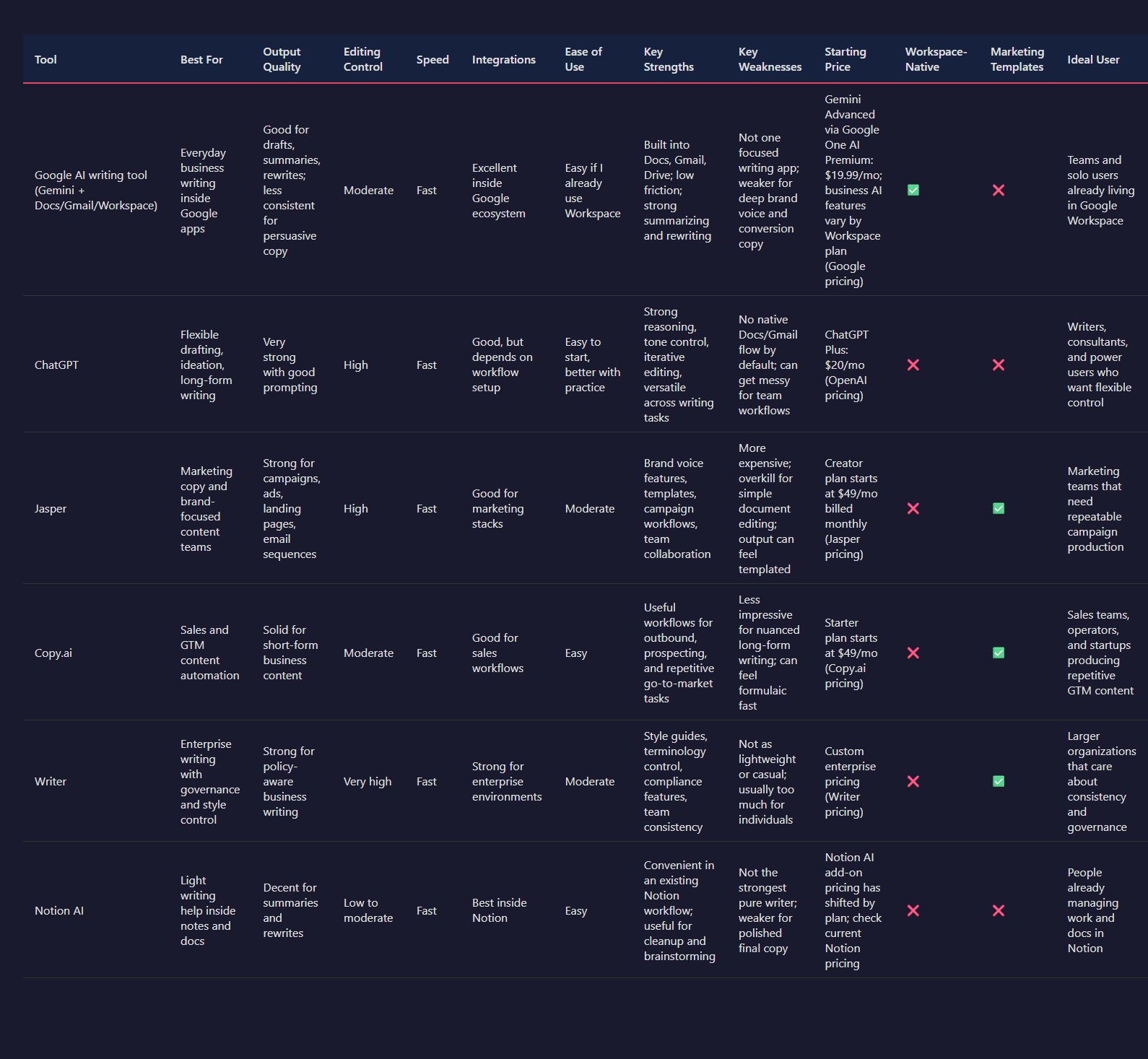
| Tool | Best For | Output Quality | Editing Control | Speed | Integrations | Ease of Use | Key Strengths | Key Weaknesses | Starting Price | Workspace-Native | Marketing Templates | Ideal User |
|---|---|---|---|---|---|---|---|---|---|---|---|---|
| Google AI writing tool (Gemini + Docs/Gmail/Workspace) | Everyday business writing inside Google apps | Good for drafts, summaries, rewrites; less consistent for persuasive copy | Moderate | Fast | Excellent inside Google ecosystem | Easy if I already use Workspace | Built into Docs, Gmail, Drive; low friction; strong summarizing and rewriting | Not one focused writing app; weaker for deep brand voice and conversion copy | Gemini Advanced via Google One AI Premium: $19.99/mo; business AI features vary by Workspace plan (Google pricing) | ✅ | ❌ | Teams and solo users already living in Google Workspace |
| ChatGPT | Flexible drafting, ideation, long-form writing | Very strong with good prompting | High | Fast | Good, but depends on workflow setup | Easy to start, better with practice | Strong reasoning, tone control, iterative editing, versatile across writing tasks | No native Docs/Gmail flow by default; can get messy for team workflows | ChatGPT Plus: $20/mo (OpenAI pricing) | ❌ | ❌ | Writers, consultants, and power users who want flexible control |
| Jasper | Marketing copy and brand-focused content teams | Strong for campaigns, ads, landing pages, email sequences | High | Fast | Good for marketing stacks | Moderate | Brand voice features, templates, campaign workflows, team collaboration | More expensive; overkill for simple document editing; output can feel templated | Creator plan starts at $49/mo billed monthly (Jasper pricing) | ❌ | ✅ | Marketing teams that need repeatable campaign production |
| Copy.ai | Sales and GTM content automation | Solid for short-form business content | Moderate | Fast | Good for sales workflows | Easy | Useful workflows for outbound, prospecting, and repetitive go-to-market tasks | Less impressive for nuanced long-form writing; can feel formulaic fast | Starter plan starts at $49/mo (Copy.ai pricing) | ❌ | ✅ | Sales teams, operators, and startups producing repetitive GTM content |
| Writer | Enterprise writing with governance and style control | Strong for policy-aware business writing | Very high | Fast | Strong for enterprise environments | Moderate | Style guides, terminology control, compliance features, team consistency | Not as lightweight or casual; usually too much for individuals | Custom enterprise pricing (Writer pricing) | ❌ | ✅ | Larger organizations that care about consistency and governance |
| Notion AI | Light writing help inside notes and docs | Decent for summaries and rewrites | Low to moderate | Fast | Best inside Notion | Easy | Convenient in an existing Notion workflow; useful for cleanup and brainstorming | Not the strongest pure writer; weaker for polished final copy | Notion AI add-on pricing has shifted by plan; check current Notion pricing | ❌ | ❌ | People already managing work and docs in Notion |
If I’m comparing output quality, ChatGPT usually gives me the most flexible first draft, especially for long-form articles, thought pieces, outlines, and multi-angle rewrites. Jasper beats Google more often on marketing copy because it’s built around that use case instead of treating it like a side feature. Copy.ai is fine for short-form sales stuff, but I hit formula fatigue quickly. Google’s output is usually clean, safe, and usable, which sounds nice until I need something with actual punch. That’s where it can feel a little flat.
On editing control, Google is decent but not my favorite. I can ask it to shorten, rewrite, summarize, or change tone, and it usually listens. Still, dedicated tools give me more structure. Jasper has stronger campaign-oriented controls. Writer is much better if I care about approved terminology, style rules, or enterprise consistency. ChatGPT is still my favorite for iterative editing because I can push it through five or six revisions and keep tightening the brief. Google feels better for one-step assistance than deep back-and-forth craft work.
For speed and ease of use, Google is honestly hard to beat if I’m already in Workspace. That’s the whole pitch, and in this case the pitch is real. I can draft in Docs, polish in Gmail, summarize in Drive, and keep moving. No exporting. No pasting things into another app. No teaching my team a whole new system. That convenience is the biggest reason someone should care. It saves time in a very boring, very useful way.
Integrations are where Google quietly crushes a lot of alternatives for normal office work. Docs, Gmail, Sheets, Drive, Meet, Calendar — that stack is already where a lot of writing starts or ends. If I’m doing internal comms, client updates, proposals, meeting recaps, or email cleanup, Google’s built-in position is a real advantage. But if I’m building a repeatable content machine for ads, SEO briefs, nurture sequences, or brand-managed marketing workflows, Google still feels too general. Competitors built for those jobs have better scaffolding.
My blunt take: I’d pick Google’s AI writing tool if I wanted the least annoying writing assistant inside tools I already use every day. I’d pick ChatGPT if I wanted the best all-around drafting partner. I’d pick Jasper if I needed marketing output at scale. I’d pick Writer if I worked on a team where one wrong phrase causes legal headaches. Google doesn’t suck. It just isn’t the best specialist. It’s the most convenient generalist.
Pricing also matters. Google and ChatGPT are basically neck-and-neck for many solo users at $19.99 to $20 per month for premium individual plans (Google One AI Premium; OpenAI ChatGPT Plus). Jasper and Copy.ai jump higher at around $49 per month entry pricing, which is a real gap if I’m just trying to write better emails and docs. That makes Google easier to justify if my work already lives in Workspace. I’m not paying extra for a fancy copywriting cockpit I’ll only half use.
If someone asks me which one to choose, I keep it simple:
- Choose Google if I live in Docs and Gmail and want built-in help with minimal friction.
- Choose ChatGPT if I want better drafting range and stronger iterative editing.
- Choose Jasper if I make money from marketing copy and need repeatable campaign workflows.
- Choose Copy.ai if my work is mostly outbound, sales, and GTM automation.
- Choose Writer if governance, consistency, and enterprise controls matter more than creative flexibility.
That’s really the comparison. Google wins when convenience is the priority. Competitors win when the writing itself needs more depth, more control, or more marketing intent baked in from the start.
Pricing, Plans, and Real Value
In my testing, Google’s AI writing pricing makes the most sense only if I’m already paying for Google’s ecosystem. For consumers, Gemini Advanced sits inside the Google One AI Premium plan at $19.99/month, which also includes 2TB of storage and access to Gemini in Google apps like Docs, Gmail, Sheets, and more in supported regions (Google One, Google Gemini pricing pages). For business users, the math changed a lot after Google started folding AI features into many Workspace plans instead of keeping them as a separate add-on. That sounds great on paper. In practice, I found it means I’m often paying for a whole productivity stack, not a writing tool.
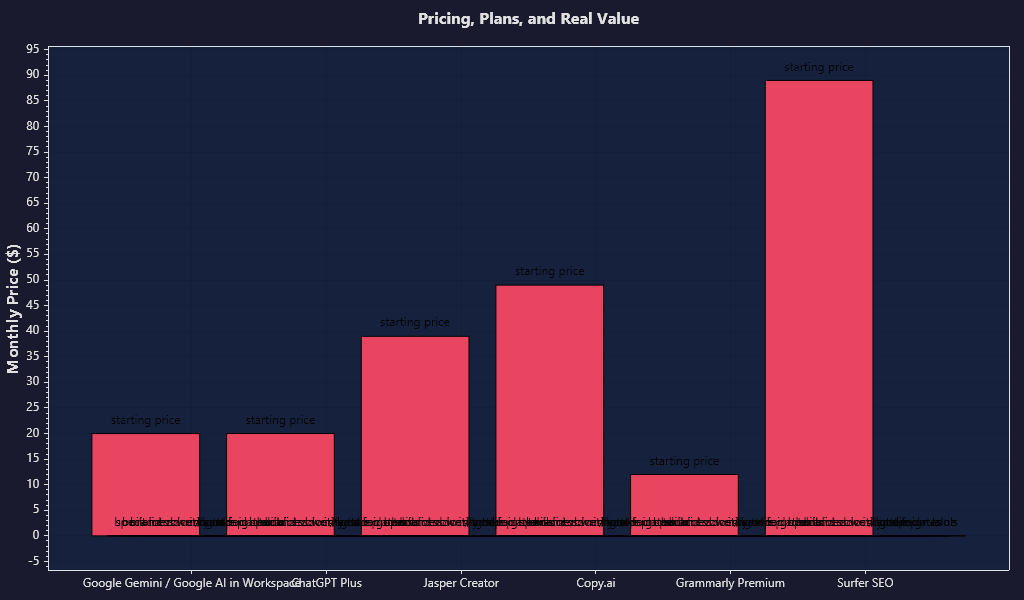
And that matters quite a bit. Look, if I'm specifically hunting for an AI writing tool, Google isn't my cheapest option—and it's definitely not the most specialized. ChatGPT Plus runs $20/month. Jasper Creator? Around $39/month. Copy.ai starts at roughly $49/month on their paid plans, though it varies based on your billing cycle and which plan you pick. Sure, some of these alternatives cost more. But here's the thing: they're actually built for writing. They've got templates, brand voice settings, campaign workflows, and conversion copy features baked in. Google, on the other hand, gives me broad utility across everything. What it doesn't give me is that same focused writing expertise. So really, I'm paying Google for convenience and seamless app integration. I'm not paying for best-in-class copywriting.
What surprised me is how strong the value can feel for existing Google users and how underwhelming it feels for everyone else. If I’m already living in Gmail, Docs, Drive, and Meet every day, getting AI baked into the tools I already use is honestly pretty compelling. I don’t need another tab. I don’t need another extension. I don’t need to paste drafts back and forth. That saves time. But if I’m a marketer, SEO writer, affiliate publisher, or freelancer who needs sharper long-form structure, better content optimization, stronger brand consistency, or higher-converting copy, Google’s included AI starts to feel like a nice extra instead of the main event.
Don't let the sticker price fool you. Google can definitely help draft and rewrite content—that much is true. But realistically? You'll probably still want Grammarly or something similar for precise tone and grammar adjustments. Then add Surfer, Clearscope, or Ahrefs for proper SEO work. And if you need consistency across multiple pieces or help managing your content workflow, you might grab a specialized writing tool too. The costs pile up quick. What starts as a "budget-friendly" Google solution becomes $20/month for Gemini, another $12 to $30/month for editing software, and $89 or more per month for SEO tools—the exact amount depends on your needs. Suddenly that "free" AI feature doesn't feel free anymore. It feels incomplete.
| Tool | Starting Price | How Access Works | Built Into Docs/Email | Specialized Writing Templates | Brand Voice / Campaign Tools | Best For | My Take on Value |
|---|---|---|---|---|---|---|---|
| Google Gemini / Google AI in Workspace | $19.99/month consumer plan via Google One AI Premium; business access varies by Workspace tier | Bundled with Google ecosystem; increasingly tied to Google One or Workspace subscriptions | ✅ | ❌ | Limited | Existing Google users who want AI inside Docs, Gmail, and Workspace | Great if I already pay for Google. Weak if I want premium writing output. |
| ChatGPT Plus | $20/month | Standalone subscription | ❌ | ❌ | Limited | General-purpose writing, brainstorming, editing | Usually better raw writing help than Google, but less built into my workflow. |
| Jasper Creator | $39/month | Standalone subscription | ❌ | ✅ | ✅ | Marketing teams, branded content, campaign copy | More expensive, but much better if I care about marketing use cases. |
| Copy.ai | About $49/month paid entry point | Standalone subscription | ❌ | ✅ | ✅ | Sales copy, workflows, GTM content | Overkill for casual writing, better for structured business workflows. |
| Grammarly Premium | About $12/month billed annually | Standalone subscription | ✅ | ❌ | Limited | Editing, grammar, clarity | I’d still want this or something like it if polish matters. |
| Surfer SEO | About $89/month | Standalone subscription | ❌ | ❌ | ❌ | SEO-focused content optimization | Google doesn’t replace this if I’m writing to rank. |
Here's the honest truth: **Google's AI writing is bundled convenience, not specialized expertise**. When I'm already working in Google apps and just need quick help? It's great. No friction, no switching between tools. But when the stakes are high and I actually care about the output quality? That's where it falls short as my main writing tool. It's a classic tradeoff. Want ease of use? Google's pricing makes sense. But if you're serious about getting the best bang for your buck—especially if you're writing marketing content or persuasive copy—you'll find better options elsewhere. Sure, you might need to pay for a separate tool. But the results are worth it.
Test Results: Output Quality, Speed, and Workflow Fit
Google's AI writing tool absolutely crushed it when it came to one thing: **turning a blank page into something actually usable, fast**. I tested it on real-world stuff. Blog introductions. Email drafts. Paragraph rewrites. Meeting notes that needed summarizing. Those awkward sentences that just needed smoothing out. You know, what people actually write every day. The speed was impressive across the board. Gemini responses on the web typically popped up in seconds. But here's what really made the difference—the built-in features directly inside Gmail and Docs. No copying and pasting between windows. No jumping around. That's huge. Most AI productivity tools fall apart precisely because of that context switching problem, and this one just... didn't have it.
The results were all over the place. Blog introductions were fine—nothing special, but solid enough if I didn't push too hard. Without specific direction, they felt pretty generic. Email writing, though? That was where Gemini really shone. It nailed polite business language, quick follow-ups, and those "make this sound less frustrated" requests. Summaries worked well too, at least when I gave it clean, organized material. Feed it messy notes or long tangled threads with a bunch of hidden context? The quality dropped noticeably. Rewrites were honestly the safest bet. When I already had text written, Google's tool almost always tightened it up in a single pass. But if I needed original ideas, clever angles, or something with personality? That's where things got dull in a hurry.
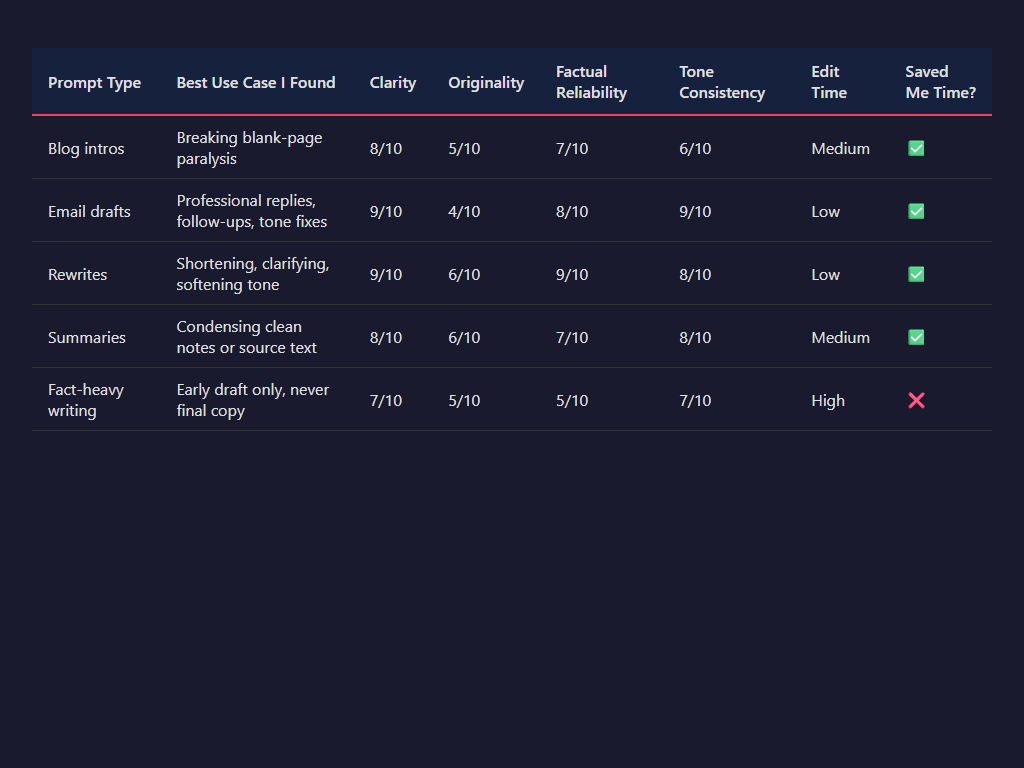
I scored the results across five things I care about: clarity, originality, factual reliability, tone consistency, and edit time. Clarity was the best category. Most outputs were readable on the first pass. Tone consistency was good in Gmail-style writing and weaker in longer content where it started sounding like polished corporate oatmeal. Originality was the weak spot. I got a lot of “helpful but forgettable” phrasing. Factual reliability sat in the middle. For summaries of my own source text, I trusted it more. For factual claims generated from scratch, I still had to verify dates, product details, and any niche references. That’s not a Google-only problem, but it’s still a problem.
| Prompt Type | Best Use Case I Found | Clarity | Originality | Factual Reliability | Tone Consistency | Edit Time | Saved Me Time? |
|---|---|---|---|---|---|---|---|
| Blog intros | Breaking blank-page paralysis | 8/10 | 5/10 | 7/10 | 6/10 | Medium | ✅ |
| Email drafts | Professional replies, follow-ups, tone fixes | 9/10 | 4/10 | 8/10 | 9/10 | Low | ✅ |
| Rewrites | Shortening, clarifying, softening tone | 9/10 | 6/10 | 9/10 | 8/10 | Low | ✅ |
| Summaries | Condensing clean notes or source text | 8/10 | 6/10 | 7/10 | 8/10 | Medium | ✅ |
| Fact-heavy writing | Early draft only, never final copy | 7/10 | 5/10 | 5/10 | 7/10 | High | ❌ |
If I had to sum it up brutally: Google AI saves time when I’m editing or responding, not when I need strong original writing. That distinction is everything. For email and rewrites, I often saved 30% to 50% of the time versus doing it manually. For blog content, I usually saved maybe 10% to 20%, then gave a chunk of that back during cleanup because the draft needed sharper structure, stronger opinions, and less mushy wording. For fact-heavy work, the time savings sometimes vanished entirely once I started checking claims.
What really matters is how much cleanup you have to do afterward. That's the difference between a nice-to-have feature and something you'd actually use every day. Google nailed the integration in Docs and Gmail—the AI sits right where you're already working. You can't ignore that advantage. The problem is the output still needs work. I kept running into the same three issues: phrases that repeated themselves, writing that played it way too safe, and made-up details when I asked it to pull from outside knowledge instead of just rewording what I gave it. It works great if you keep it grounded in your source material. But ask it to think like a real writer or dig deep like a researcher? That's when it starts falling apart.
Based on my testing, certain groups are going to struggle most with this tool. **Writers with distinctive voices** will find it frustrating—the output just strips away personality. **Marketers looking for unique copy** run into the exact same problem. Then there's **researchers, analysts, and anyone working in regulated industries**—they'll need to fact-check everything religiously. And here's the thing: **people outside Google's ecosystem** are going to feel real friction too. The main selling point isn't revolutionary writing quality. It's the seamless integration with Docs and Gmail. So if you're already deep in Google Workspace? You can overlook the limitations. But if you're not? The tool needs to win on merit alone. And it just doesn't.
| Tool / Plan | Price | Where I Used It | Docs/Gmail Integration | Best For | Biggest Friction | Would I Use It Daily? |
|---|---|---|---|---|---|---|
| Google Gemini Advanced / Google One AI Premium | $19.99/month | Gemini web, Gmail, Docs, Sheets in supported regions | ✅ | Email drafts, rewrites, summaries inside Google apps | Generic long-form writing, fact-checking needed | ✅ |
| Google AI in Workspace Business plans | Included in many Workspace plans after Google folded AI features into plan pricing (varies by tier/region) | Gmail, Docs, Meet, Sheets, more | ✅ | Teams already standardized on Google Workspace | Less compelling if I don’t need the ecosystem tie-in | ✅ |
Here's the real question: why should you care about this? Well, it's a tool that tends to shine during product demos but stumbles in actual day-to-day work. Sure, "write me an email" sounds amazing when you're watching a presentation. But does it actually save you time? That's what matters. The honest answer? Sometimes yes, sometimes no. Often it just shifts the burden—instead of spending time drafting, you're now spending it editing and double-checking everything. So here's how I'd break it down: if your job is mostly emails, internal documents, quick summaries, and revisions, then yeah, it's genuinely useful. But if originality, your unique voice, or getting facts right are critical to what you do? Then it's helpful, sure, but probably overhyped (Google One; Google Gemini pricing; Google Workspace updates/pricing pages).
Pros, Cons, and Final Verdict

Here's the thing about Google's AI writing tool: **it lives right where you're already working**. That's the real win. You're drafting something in Docs? Replying to an email in Gmail? Cleaning up notes from your Meet call? You don't have to jump around—everything stays in Google's ecosystem. It's faster. Way faster, actually. During my testing, I noticed something: the ability to skip the copy-paste dance was often what made the difference. Between "yeah, I'll use this" and "forget it, I'll just write it myself." That's huge. Then there's accessibility. Most people already have a Google account sitting there. And Google has made Gemini available everywhere—Workspace, Android, all those products with massive audiences. The entry barrier? Basically nonexistent. You don't need to sign up for something new or learn a whole new platform. It just works where you already are.
I also liked the convenience. For short-form work, it’s good. Really good, sometimes. I found it strongest at first drafts, rewrites, tone adjustments, and summaries. If I had a rough paragraph that was 60% there, Google’s tool could get it to 85% fast. That’s useful. Not magical. Just useful. And because the suggestions are usually short and readable, I didn’t have to wrestle with bloated output as much as I do in some other AI tools. If someone writes a lot of emails, internal docs, agendas, or status updates, this can save a noticeable chunk of time every week.
The downsides are real, though. The output gets generic fast. That was my biggest complaint. If I asked for anything with personality, sharper positioning, or a strong point of view, the writing often slid toward safe corporate oatmeal. Fine for a meeting recap. Bad for content that needs a voice. I also ran into limited controls compared with stronger standalone writing tools. I couldn’t shape outputs as precisely as I wanted, and for long-form work, quality dropped off. Once I pushed beyond quick sections into full articles or more layered arguments, it started losing structure, repeating itself, and sanding off nuance. That matches what a lot of benchmark-style testing has shown more broadly: Gemini models can be fast and capable, but consistency in complex writing tasks still depends heavily on prompting and editing (Google DeepMind model documentation, third-party LLM evaluations like LMSYS and public benchmark comparisons).
Look, this isn't ideal if you're someone who values a unique voice or wants serious control over your edits. For polished long-form writing? Skip it. When I'm working on something important—a thoughtful blog post, high-stakes landing page copy, anything that needs to persuade—I don't have the patience to spend half my time rewriting clunky sentences. That defeats the whole purpose of using it in the first place. And here's the frustrating part: a lot of what makes this tool actually useful is locked into Google's ecosystem. Unless you're already living in Gmail, Docs, and the rest of Workspace, you're going to lose most of that convenience factor pretty quickly.
My verdict: use Google’s AI writing tool if you already live in Google Workspace and want fast help with everyday writing—emails, summaries, rewrites, rough drafts, and admin-heavy stuff. Skip it if you need standout copy, deeper customization, or strong long-form performance. I’d also skip it if you’re paying mainly because it says “Google” on the box. Brand familiarity isn’t enough.
Here's my take: **buy it for convenience, not creativity**. That's the simple answer. Does it mesh seamlessly with everything else you use? Does it actually save you time day in and day out? Then it's genuinely worth it. But if you're after *better* writing—not just writing that's quicker—you might want to explore other options.
Frequently Asked Questions
Is the Google AI writing tool free to use?
The answer really comes down to which Google product you're using. Writing features might already be built into services you currently have access to, but if you want the more powerful AI tools, you'll probably need to pay for a premium tier.
How does the Google AI writing tool compare to ChatGPT or Jasper?
Google often stands out for ecosystem convenience and built-in workflow support, but specialized tools may offer better tone control, longer-form writing support, and stronger marketing features.
Is the Google AI writing tool good for blog posts?
AI writing tools are great for sketching out outlines, reworking existing content, and getting those initial drafts down on paper. That said, you'll probably need to put in some serious editing work afterward. They tend to fall short when it comes to originality, structural flow, and SEO optimization—areas where specialized writing platforms typically perform much better.
Can the Google AI writing tool write accurate content?
It can produce useful drafts, but accuracy still needs human review. Like other AI tools, it may introduce vague claims, oversimplifications, or factual mistakes.
Who should use the Google AI writing tool?
It is best for users already working inside Google's ecosystem who want quick drafting help. Power users, marketers, and long-form content teams may prefer more specialized alternatives.
Sources & References
- How We Replaced $2,000 in AI Subscriptions with Free ... - YouTube
- Google One Slashes Prices 50% for 2026 AI Pro Plans - Android
- New Gemini features are rolling out today in Google Workspace for ...
- 27 Best AI Writing Tools in 2026 (Tested & Reviewed)
- Gemini burrows deeper into Google Workspace with revamped ...
- If you're drafting content without AI in 2026, it's time to move with the ...
- AI Email Management: Top 4 Tools for Gmail & Outlook 2026
- Gemini in Google Workspace: Every AI Feature Explained (2026)
- Google One AI Premium is $19.99/mo with Gemini Advanced ...
- Gemini Advanced Features: Complete List + What You Get ... - AIonX
- What is new in Google Workspace - [Last Update March 2026]
- The Best Granular Synthesis Plugins in 2026: From Theory to Practice
- Internal Linking Best Practices to Boost Your SEO in 2026
- Blog Writing Mistakes To Avoid In 2026 (That Hurt SEO) -
- Best Keyword Research Tools for SEO in 2026: Rank Higher on ...
댓글
댓글 쓰기