My Search for the Best AI Writing Tool
Why I Started Looking for the Best AI Writing Tool

I started looking for the best AI writing tool after burning an embarrassing amount of time on apps that sounded sharp in the demo and then coughed up the same beige sludge once I actually used them. You know the stuff. “Unlock your potential.” “Elevate your brand.” “In today’s fast-paced digital landscape...” Absolute wallpaper. I’d spend 20 minutes prompting, tweaking, regenerating, and still end up rewriting 70% of the draft myself. (David Baum's Post) At that point, the tool isn’t saving time. It’s cosplay.
And yeah, I’ve put real money into this. I’ve spent over $2,000 on AI subscriptions in the last year alone. (Which AI subscription is actually worth it for everyday use in 2026?) Not theory. Not affiliate brochure fluff. Actual card charges. I started testing these tools because I wanted help with very normal work: blog drafts when I had a decent idea but a messy first pass, product descriptions when I needed 15 variations without sounding like a robot with a marketing degree, email replies when my brain was cooked, and outlines when I knew the topic but not the shape yet.
That turned into a weird little obsession.
I’d run the same prompt across multiple tools, compare outputs side by side, then poke at the edges. Which one handled tone without going syrupy? Which one could write clearly without stuffing every paragraph with buzzword confetti? Which one actually listened when I said “shorter,” “less salesy,” or “stop repeating yourself”? A lot of them failed in very boring ways. Fast, sure. Useful? Eh.
I’m not coming at this like an AI evangelist. I’m skeptical by default. Honestly, I think that’s the only sane way to test writing tools in 2026. (How I Test AI Writing Tools for SEO (My 2026 Framework)) The market is packed with inflated promises, vague feature lists, and screenshots of outputs that were obviously cherry-picked within an inch of their life. So I didn’t build this review as a hype parade. I looked for tradeoffs. Where a tool is great, I’ll say it. Where it falls apart, I’ll say that too. If something sucks for real-world writing, I’m not going to pat it on the head and call it “promising.”
What I wanted — and what I’m giving here — is a practical shortlist, not a bloated catalog of 27 tools nobody has time to test. I’m focusing on the ones that matter for actual use cases: drafting blog posts, tightening product copy, writing emails that don’t sound uncanny, and building outlines fast enough to be useful. You’ll get the honest upside, the annoying quirks, and the situations where a tool is either surprisingly good... or a complete dud.
Because that’s really the whole point, right? Not finding the tool with the loudest homepage. Finding the one that saves me an hour instead of stealing two.
How I Tested Each Tool Without Falling for the Hype

So I got picky.
I tested every tool the same way, because that’s the only way this kind of roundup means anything. Same prompts. Same deadlines. Same content types. If one app got a 1,200-word blog post brief, they all got that exact brief. (How long should an ideal blog post be in 2026? : r/seogrowth - Reddit) If one had 15 minutes to produce a usable draft, they all had 15 minutes. (My Weird Days: How I Actually Work in 2026 | by Tim O'Brien - Medium) No special treatment, no “well this one is really better for outlines” excuses. I ran each tool through the same core batch: a blog intro, a product description, a cold email, a landing page section, a social post set, and a light edit/rewrite task. Boring? Maybe. Fair? Yeah.
I ended up using a test set of 18 prompts across 6 content formats, then repeated the strongest prompts more than once to see if the tool stayed sharp or just got lucky. Some absolutely fell apart on the second pass. First draft looked decent, then the next one came out like a haunted LinkedIn post.
What I cared about was pretty simple:
- Output quality — Did the writing sound human, specific, and usable, or was it generic mush?
- Factual reliability — Did it invent stats, fake examples, or quietly smuggle in nonsense?
- Editing needed — Was I polishing 10% of the draft or rebuilding 60% of it?
- Speed — Not just generation time, but time to get something I’d actually publish.
- Ease of use — Could I get moving fast, or did the interface fight me for no reason?
- Collaboration features — Comments, shared workspaces, version history, approvals. Real team stuff.
That middle one — factual reliability — mattered more than a lot of companies seem to think. I don’t care if a tool can spit out 8 headline variants in 4 seconds if 2 of them contain made-up claims and another 3 sound like a robot trying to sell vitamins. Fast wrong answers are still wrong. And when I checked questionable claims against live sources, product docs, and public references, a few tools got wobbly fast. Not catastrophic every time, but enough that I wouldn’t trust them unsupervised. Nope.
I also paid attention to how much cleanup each draft needed, because that’s where a lot of AI writing tools quietly waste your afternoon. A tool can look impressive in a demo and still hand you copy that needs 30 minutes of sanding before it stops sounding like ad-school oatmeal. In my testing, the difference between the best and worst tools was usually editing load, not raw word count.
And I barely gave extra points for flashy templates, giant prompt libraries, or marketing pages full of “write 10x faster” chest-thumping. I’ve spent more than $2,000 on AI subscriptions this year, and I’ve learned that shiny template galleries are often decorative mulch. Nice to look at. Doesn’t mean the engine underneath is any good. If a tool had 200 templates but still produced stale copy, I treated that exactly how I should: as a bad writing tool with a costume on.
I’m also not overly impressed by brand-name customer logos, vague productivity claims, or testimonials that read like they were written by the company’s own intern after two espressos. If a tool said it could cut writing time by 80%, I wanted to feel that in actual use — fewer rewrites, fewer prompt retries, fewer weird detours into nonsense. Otherwise it’s brochure poetry.
This review is most useful if you’re a solo creator trying to publish faster without sounding fake, a marketer juggling landing pages and campaign copy, a freelancer who needs decent drafts on a deadline, or a small team that actually needs comments, shared workflows, and some guardrails. If you’re a giant enterprise buying software because a sales rep took you to steak, I’m probably not solving your problem here.
I wanted tools that worked in the messy real world — half-finished briefs, annoying deadlines, multiple formats, last-minute edits, and that constant little voice asking, “Cool, but can I actually use this without rewriting the whole thing?” That was the bar.
The Side-by-Side Comparison That Actually Helped
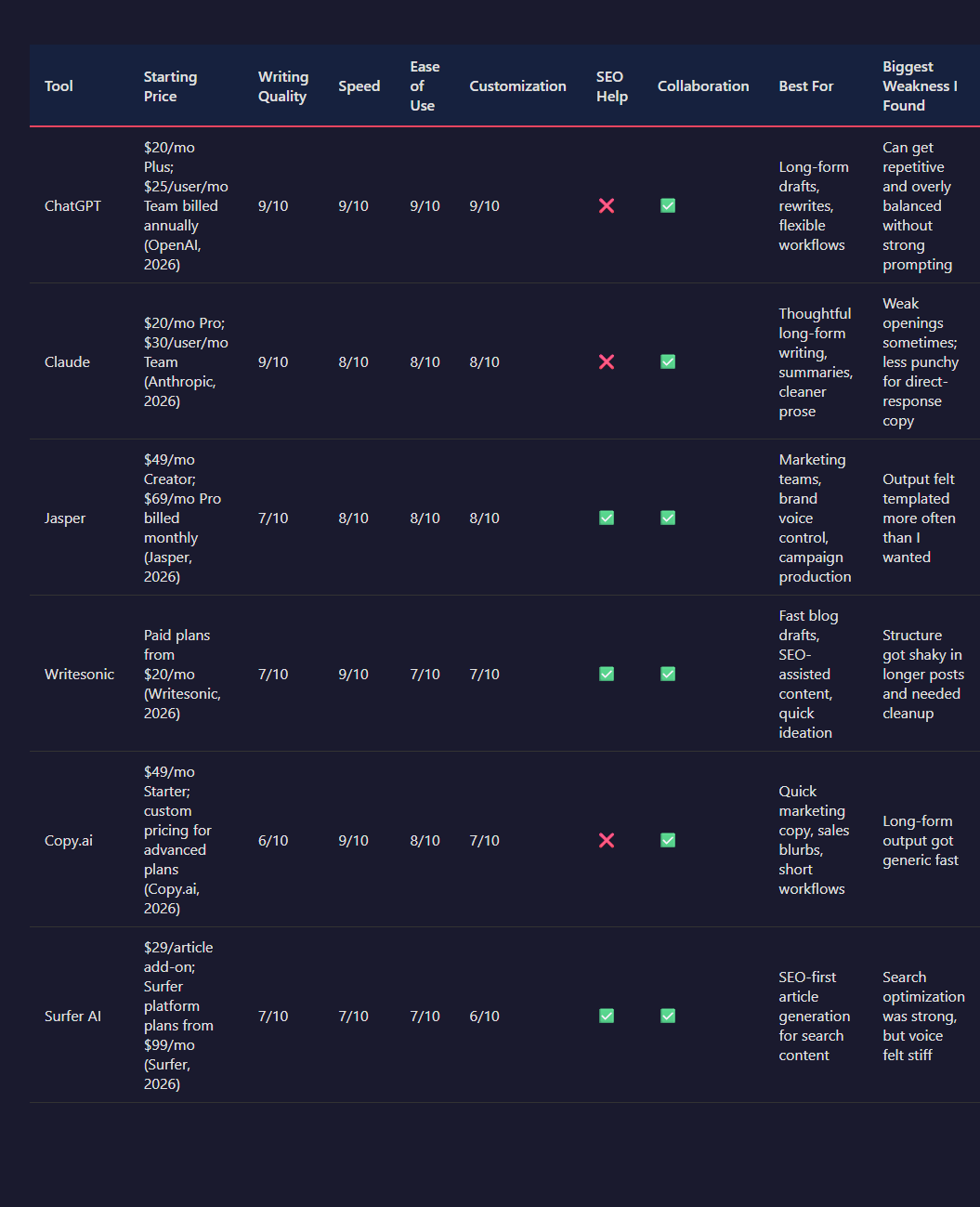
This is the part I wish more roundups did properly.
I didn’t want another fluffy “Tool A is great for creators, Tool B is great for teams” chart with zero blood in it. I wanted one place where I could see, side by side, which tool actually wrote well, which one moved fast, which one made me fight the interface, and which one quietly wasted 20 minutes because the draft looked polished until I read paragraph 4 and realized it was looping the same point in three slightly different outfits.
So I stacked the strongest options against each other: ChatGPT, Claude, Jasper, Writesonic, Copy.ai, and Surfer AI. Same prompts. Same timer. Same editing standard. For long-form, I judged them on whether I could get from prompt to publishable draft without doing a full rewrite. For short-form, I cared more about speed, punch, and how often the copy sounded like a caffeinated intern trying too hard.
| Tool | Starting Price | Writing Quality | Speed | Ease of Use | Customization | SEO Help | Collaboration | Best For | Biggest Weakness I Found |
|---|---|---|---|---|---|---|---|---|---|
| ChatGPT | $20/mo Plus; $25/user/mo Team billed annually (OpenAI, 2026) | 9/10 | 9/10 | 9/10 | 9/10 | ❌ | ✅ | Long-form drafts, rewrites, flexible workflows | Can get repetitive and overly balanced without strong prompting |
| Claude | $20/mo Pro; $30/user/mo Team (Anthropic, 2026) | 9/10 | 8/10 | 8/10 | 8/10 | ❌ | ✅ | Thoughtful long-form writing, summaries, cleaner prose | Weak openings sometimes; less punchy for direct-response copy |
| Jasper | $49/mo Creator; $69/mo Pro billed monthly (Jasper, 2026) | 7/10 | 8/10 | 8/10 | 8/10 | ✅ | ✅ | Marketing teams, brand voice control, campaign production | Output felt templated more often than I wanted |
| Writesonic | Paid plans from $20/mo (Writesonic, 2026) | 7/10 | 9/10 | 7/10 | 7/10 | ✅ | ✅ | Fast blog drafts, SEO-assisted content, quick ideation | Structure got shaky in longer posts and needed cleanup |
| Copy.ai | $49/mo Starter; custom pricing for advanced plans (Copy.ai, 2026) | 6/10 | 9/10 | 8/10 | 7/10 | ❌ | ✅ | Quick marketing copy, sales blurbs, short workflows | Long-form output got generic fast |
| Surfer AI | $29/article add-on; Surfer platform plans from $99/mo (Surfer, 2026) | 7/10 | 7/10 | 7/10 | 6/10 | ✅ | ✅ | SEO-first article generation for search content | Search optimization was strong, but voice felt stiff |
If I’m being blunt, two tools kept winning the actual writing test: ChatGPT and Claude. Not because they had the prettiest dashboards. I barely care. They won because when I asked for a 1,200-word article draft, they gave me something with a real spine. ChatGPT was faster — usually under 2 minutes for a full draft in my tests — and better at adapting when I pushed it with follow-up instructions. Claude was slower by maybe 20 to 40 seconds on average, but the phrasing was often less clunky on the first pass.
That said, they didn’t fail the same way. ChatGPT had a habit of repeating the core idea in different wording, especially in intros and conclusion sections. Not every time, but enough that I noticed it in roughly 3 out of 10 long-form outputs. Claude’s weird flaw was structure drift. It would start strong, then soften in the middle with sections that sounded smart yet didn’t really move the piece forward. Sneaky problem. You don’t catch it until editing.
For long-form content, I’d pick ChatGPT first if I wanted control and speed. I’d pick Claude first if I cared most about tone and cleaner natural language. Those were the only two where I consistently felt like I was editing a draft instead of rescuing one.
Now the marketing-copy crowd. Different race.
Copy.ai and Jasper were much better when I needed quick hooks, product blurbs, ad variants, or cold outreach angles. Copy.ai was absurdly fast for short stuff — a few seconds for usable options — and I liked it most when the job was “give me 10 decent angles now.” But the moment I stretched it into a full article, the wheels got wobbly. It started sounding broad, polished, and empty. Very “AI wrote this while making direct eye contact.”
Jasper was more controlled. Better brand handling too. If I were on a content team juggling landing pages, email campaigns, and paid social copy across multiple people, I’d trust Jasper more than Copy.ai. The catch is price. At $49 per month to start (Jasper, 2026), I need it to save me real time, not just give me a shinier wrapper around output I could get elsewhere. In my testing, Jasper’s drafts still needed noticeable human seasoning. Less chaos than cheaper tools, sure. But not magic.
Writesonic landed in the awkward middle. Fast, useful, occasionally impressive — and then it would hand me a blog post that looked solid until I read it closely and found weak transitions, mushy section hierarchy, or paragraphs that wandered off like they forgot why they existed. For SEO-driven drafts, though, I get the appeal. If I needed volume and I already knew I was editing heavily, I could make it work.
Surfer AI was the most specialized of the bunch. I wouldn’t use it as my everyday writing tool. I would use it when the assignment was blatantly search-first and I wanted optimization guardrails baked in. It did a better job aligning content around SEO targets than the general-purpose chat tools, which isn’t shocking, but the tradeoff was voice. The copy felt a bit ironed flat. Competent. Not lively.
And ease of use? Honestly, the simplest tools weren’t always the most helpful. ChatGPT won on flexibility because I could go from outline to draft to rewrite to headline test in one thread without the app getting in my way. Copy.ai was easier for quick wins, but also more boxed in. Jasper had more team-friendly controls, yet that extra structure sometimes felt like wearing a blazer to make toast.
Customization had a similar split. ChatGPT and Jasper gave me the most control over voice, structure, and revision direction. Claude responded well to nuanced prompts, but I found it slightly less steerable when I wanted sharper conversion-focused writing. Surfer AI was the least flexible stylistically in my testing, because it clearly wants to keep you inside its SEO lane. Which is fine. Just don’t expect fireworks.
Here’s my actual takeaway after running these tools back to back: there isn’t one best AI writing tool for everyone. Annoying answer, I know. But true.
- ChatGPT: best for solo writers, marketers, and generalists who need one tool that can handle long-form, editing, brainstorming, and rewrites without constant friction.
- Claude: best for people who care about natural-sounding prose and thoughtful long-form drafts more than raw speed.
- Jasper: best for marketing teams that need brand controls, collaboration, and repeatable campaign workflows.
- Copy.ai: best for fast short-form copy, sales snippets, and idea generation when quantity matters more than depth.
- Writesonic: best for SEO-minded users who want fast draft generation and don’t mind heavier editing afterward.
- Surfer AI: best for search-focused publishers who want optimization built into article creation from the start.
If I had to cut through the noise and keep only two? I’d keep ChatGPT for range and Claude for writing feel. The rest weren’t bad. Some were genuinely useful. But a few of them made me do that annoying thing where I spend 15 minutes “saving time.” You know the type.
Where Each Tool Won Me Over and Where It Fell Apart
This is where the nice marketing screenshots stop helping.
In my testing, the gap between “looks impressive in a demo” and “I’d actually use this on a Tuesday when I’m tired and behind” was huge. Some tools were brilliant at coughing up angles fast. Some were weirdly good at tone control. A couple gave me that little jolt of hope on draft one, then collapsed the second I asked for specificity, brand nuance, or anything involving facts that couldn’t be guessed from internet mush.
And yeah, pricing mattered more than I expected. I’ve spent over $2,000 on AI subscriptions this year, so I’m not allergic to paying. But I really hate the bait-and-switch rhythm where a tool sells “unlimited writing” and then walls off the useful models, team features, or higher-quality outputs behind another tier. That stuff gets old fast.
Here’s where the main tools actually won me over — and where they faceplanted.
| Tool | Starting Price | What I Liked | Where It Fell Apart | Tone Control | Templates | Brand Voice Features | Fact Risk | Best For |
|---|---|---|---|---|---|---|---|---|
| ChatGPT | $20/mo for Plus (OpenAI, 2026) | Fast idea generation, flexible prompting, strong rewriting | No built-in writing workflow, quality depends heavily on prompts | ✅ | ❌ | Limited | Medium | Writers who know what to ask for |
| Jasper | $49/mo Creator plan (Jasper, 2026) | Good marketing templates, decent brand voice controls, team-friendly setup | Can sound polished but generic, expensive for solo users | ✅ | ✅ | ✅ | Medium | Marketing teams and content ops |
| Copy.ai | $49/mo Starter plan (Copy.ai, 2026) | Quick workflows, lots of use-case templates, easy onboarding | Output gets repetitive, upsells hit early, weak nuance | ✅ | ✅ | Limited | Medium | Fast first drafts and sales copy |
| Writesonic | From $20/mo individual plan (Writesonic, 2026) | Good speed, broad feature set, useful for SEO-style content production | Interface feels crowded, quality jumps around too much | ✅ | ✅ | Limited | Medium-High | Volume content and experimentation |
| Writer | Custom enterprise pricing (Writer, 2026) | Strong governance, style guide support, better for brand consistency | Overkill for most solo users, less fun for raw ideation | ✅ | ❌ | ✅ | Low-Medium | Larger teams with strict voice rules |
| Claude | $20/mo for Pro (Anthropic, 2026) | Natural long-form drafting, often less stiff than competitors | Can get floaty, occasionally overexplains, still needs fact checks | ✅ | ❌ | Limited | Medium | Long-form drafting and synthesis |
ChatGPT: still the best blank-page killer
I kept coming back to ChatGPT because it’s absurdly fast at turning fog into structure. Give it a rough idea, a reader type, and a goal, and it’ll usually hand back 5 to 10 usable angles in under a minute. For idea generation, intros, reframes, headline variations, and “make this less wooden” cleanup, it’s still the tool I reached for first most often.
What surprised me was how good it got when I fed it ugly raw material. Notes. Bullets. Half-baked arguments. Fragments that looked like I typed them while walking. It handled that mess well. Better than some “writer-first” tools, honestly.
But out of the box? Nope. If I gave it lazy prompts, I got shiny oatmeal back. Clean sentences, empty calories. And because there’s no real built-in content workflow the way Jasper or Copy.ai tries to offer, I had to do more steering myself. I don’t mind that. Beginners usually do.
It also still carries factual risk, especially when it fills in missing details with suspicious confidence. If I’m writing anything with stats, product claims, legal angles, or even recent feature comparisons, I verify manually. Every time.
Jasper: better control, worse value
Jasper won me over on structure. I found it easier than most dedicated writing apps to move from brief to draft without feeling like I was assembling IKEA furniture with missing screws. Templates were plentiful, the workflow made sense, and the brand voice tooling was more useful than the vague “sound like your company” fluff I’ve seen elsewhere.
For teams, I get the appeal. For one person paying out of pocket? Oof.
The starting price lands at $49/month for Creator (Jasper, 2026), and I just don’t think the output quality consistently clears that bar for solo writers. Too often, Jasper produced copy that felt professionally ironed and emotionally dead. Not bad. Worse, actually. Forgettable. The kind of draft that makes you think “nice” and then immediately start rewriting 40% of it.
That was the recurring pattern: solid workflow speed, decent tone control, but phrasing that drifted toward safe corporate beige. If your brand voice is sharp, odd, playful, or even just slightly human, you’ll still need to wrestle it into shape.
Copy.ai: quick hit, short shelf life
I liked Copy.ai most in the first 15 minutes.
It’s easy to use, fast to onboard, and packed with templates. If I needed rough sales copy, product blurbs, email variants, or campaign ideas in bulk, it moved. No drama. It gave me momentum fast, which matters more than people admit.
Then the cracks showed.
In longer workflows, the writing started repeating itself. Same claim, different jacket. Same rhythm, different nouns. And once I noticed that pattern, I couldn’t unsee it. For short-form output, fine. For anything that needed layered reasoning or a distinct editorial voice, it ran out of runway early.
I was also annoyed by how quickly you bump into plan boundaries if you want the more serious automation and workflow features. The base pricing looks friendly at first glance, then the real use case starts inching upward. Classic SaaS nibble attack.
Writesonic: lots of buttons, mixed results
Writesonic felt like three products wearing one trench coat.
Sometimes that worked in its favor. I found it useful when I wanted speed, template variety, and SEO-adjacent content help in one place. It can crank through outlines, drafts, and variations quickly, and the price starts lower than Jasper at around $20/month for individuals (Writesonic, 2026), which makes experimentation less painful.
Still, the interface felt busier than it needed to be, and the output quality had more swing than I like. One draft would be crisp and usable. The next would sound like a content intern trying to impress an algorithm. That inconsistency bugged me more than a tool being merely average, because average at least is predictable.
And when a writing tool is unpredictable, workflow speed doesn’t always help. If I save 8 minutes generating a draft and then spend 25 untangling vague claims and clunky phrasing, that’s not speed. That’s a costume.
Writer: the adult in the room
Writer impressed me for a different reason. It clearly cares about governance, consistency, and not letting teams publish weird off-brand sludge. If I were running content for a company with strict terminology rules, legal review pressure, and 12 people touching the same messaging, I’d take it seriously.
Its style guide and brand controls are the part that felt genuinely useful, not decorative. That matters. Most tools say they support brand voice, but what they really mean is “paste in a paragraph and hope.” Writer was more disciplined than that.
For solo creators, though, it felt heavy. Less spark, more policy binder. I wouldn’t pick it as my first tool for brainstorming or loose creative drafting, because that’s not really its personality. It’s there to keep the train on the tracks, not to make the trip interesting.
Claude: surprisingly good at sounding like a person
Claude won me over on long-form flow. In my testing, it often wrote with a more natural cadence than the more template-heavy writing tools, especially when I wanted exploratory drafts, article sections, summaries, or rewrites that didn’t instantly smell AI-generated.
I liked it most when I already had direction and needed a thinking partner, not a button-mashing template machine. It handled nuance pretty well. It also tended to keep context across a long draft without getting as brittle as some competitors.
But it could get a little wispy. That’s the word. Wispy. Sometimes elegant, sometimes just drifting. I’d ask for precision and get a thoughtful cloud. Better than robotic sludge, sure, but still not what I needed if I was writing conversion-focused copy or anything where the argument had to hit hard and clean.
And yes, same rule as the others: I don’t trust it blindly on facts. Nice prose can still be wrong.
So which weaknesses actually mattered most?
For me, the biggest recurring failure wasn’t grammar, speed, or even price. It was voice. Most AI writing tools can produce readable text now. Big deal. The real problem is that readable text isn’t the same thing as memorable text, and it definitely isn’t the same thing as your text.
That’s where bland phrasing, weak brand alignment, and fake confidence around facts become expensive. Not just annoying. Expensive. If a tool saves me 20 minutes drafting but costs me 35 minutes sanding off generic phrasing, checking invented details, and re-injecting personality, I didn’t win anything.
So the tools that won me over were the ones that either gave me speed without too much cleanup, or gave me enough control that the cleanup felt deliberate instead of punitive. The tools that fell apart were the ones that looked polished at first glance and then made me do forensic editing by paragraph four. I’ve had enough of those.
Pricing: What You Really Get for the Money

Pricing is where a lot of these tools get sneaky.
I found the “starts at $19/month” pitch usually meant “starts at $19 if I barely use it, don’t need the better model, don’t want brand voice features, and never hit the annoying cap they hid three scrolls down the pricing page.” That’s the real trick. The sticker price often wasn’t the price of the version I’d actually want to use.
Free plans were all over the map. A few were genuinely useful for testing tone, short-form copy, or one-off rewrites. Others were basically interactive billboards — enough credits to generate 500 to 2,000 words, hit one limit, then get shoved into an upgrade screen. Jasper’s free trial has historically been time-limited rather than a real ongoing free plan, which tells me they know heavy usage gets expensive fast (Jasper, 2026). Copy.ai has offered a free tier with limited words and chat access depending on the plan version, but the restrictions were tight enough that I wouldn’t call it a serious daily option for anyone publishing more than a couple pieces a week (Copy.ai, 2026). ChatGPT’s free plan is still weirdly strong for casual drafting, but usage limits and model access throttling can kick in right when I’m on a roll, which is... irritating (OpenAI, 2026).
If I just needed help breaking blank-page paralysis, a free plan was often enough. That’s the honest answer. For outlines, headline variants, product descriptions, email rewrites, social posts — sure. I wouldn’t pay $40 a month just to avoid writing 10 subject lines.
Entry tiers usually landed between $15 and $49 per month. That’s the danger zone, because this is where the value gets fuzzy. In my testing, the jump from free to entry paid plan often did improve the experience, but not always the writing quality itself. More often I got fewer throttles, longer generations, project history, better organization, and access to templates I probably didn’t need. Helpful? Yeah. Miraculous? Nope.
And templates are one of the oldest pricing tricks in this category. A tool will brag about “100+ templates,” but half of them are just thin wrappers around the same model prompt: blog intro, blog outline, blog conclusion, blog paragraph, blog ideas. That’s not 5 different powers. That’s one power wearing 5 hats and asking for my credit card.
Premium tiers were where I expected a dramatic output jump. I didn’t usually get one. What I got instead was team collaboration, shared brand voice, approval workflows, multiple seats, admin controls, API access, or higher monthly word caps. Those things matter a lot for agencies and in-house teams. For a solo writer? I’m mostly paying to manage people who do not exist.
That was the pattern I kept seeing: higher-priced plans improved operations more than writing. The draft quality bump from a $20 plan to a $79 or $99 plan was often modest unless the upgrade also unlocked a meaningfully better model. If the premium tier included access to GPT-4-class models, Claude-level reasoning, or stronger long-form memory, I noticed it. If it mostly added team spaces and analytics dashboards, I didn’t. I’m not paying an extra $50 a month so a content manager can leave comments for my imaginary intern.
Usage limits matter more than the monthly fee. I’d argue they matter way more.
A $29 plan with a 50,000-word cap sounds generous until I realize one serious long-form workflow can burn 3,000 to 6,000 words between brainstorming, false starts, rewrites, expansions, and cleanup. Do that 15 times in a month and the math gets ugly fast. Same story with “unlimited” plans that quietly rate-limit speed, restrict premium models, or cap how much context I can send in one go. Unlimited-ish. Cute.
I also ran into hidden costs that don’t show up in the hero pricing block. Brand voice packs. Plagiarism checks. SEO scoring. Extra seats. Premium knowledge bases. CMS integrations. API usage. Image generation credits. Some tools looked affordable until I added the one or two extras that made them viable for real work, and suddenly the total jumped 40% to 120% above the advertised base plan. Writesonic, for example, has separated access by model quality and feature set in ways that can materially change value depending on how often I need premium generations versus basic ones (Writesonic, 2026). Sudden bloat. Very common.
What surprised me was how often low-cost plans were enough for good writers. If I already know how to structure an article, edit for tone, and fact-check aggressively, I don’t need the fanciest tier. I need fast ideation, decent rewrites, and maybe a reliable long-form assistant. That’s it. In that setup, a free plan or something in the $20 to $30 range can carry a lot of weight.
Paying more made sense for me only in a few cases.
- I was publishing at volume — think 20+ long pieces a month, not 4.
- I needed shared brand controls across multiple writers or clients.
- I wanted access to a clearly better model, not just more templates and shinier buttons.
- I was using the tool as part of a workflow stack with docs, CMS, SEO software, and automations that saved real time every week.
If none of that applies, I’d stay cheap. Honestly, I’d stay very cheap.
I wouldn’t tell most people to start with a premium tier. I’d start free, hit the limits on purpose, and watch where the friction actually appears. If I keep running into caps, losing useful drafts, or needing features that remove repeated grunt work, then I’d upgrade one step — not three. The minute a tool asks me for enterprise money before it has proven it can produce cleaner drafts, better rewrites, or sharper ideas, I’m out.
Because that’s the whole thing, really: I’m happy to pay for better output. I’m much less excited to pay for fancier packaging around the same mediocre paragraph.
Who Should Use Which AI Writing Tool

Feature lists can hypnotize people. I’ve done it too. Forty templates, 1-click brand voice, 50+ languages, SEO scoring, team workspaces, chrome extension, fireworks, confetti. Cool. But if the tool fights my actual workflow, I’m gone in 2 days.
That’s the thing I keep coming back to: the best AI writing tool usually isn’t the one with the longest sales page. It’s the one that gets me from blank page to usable draft with the fewest annoying detours.
For bloggers, I’d split it fast. If I’m a solo blogger publishing 4 to 8 posts a month and I mostly need help with outlines, rough drafts, rewrites, and headline testing, I’d pick a tool that’s simple and forgiving. ChatGPT fits that lane well because I can go from idea to draft without learning some weird dashboard. Jasper can work too, but I only like it for bloggers if I’m publishing enough to justify the price and I actually want the brand voice stuff. If I’m a beginner blogger, too many controls can weirdly slow me down. I’ve seen people spend 20 minutes fiddling with settings to save 5 minutes writing. Bad trade.
If I’m running a content-heavy blog — say 20+ articles a month — then I care less about “fun to use” and more about repeatability. That’s where tools with stronger workflows, saved prompts, collaboration, and brief generation start making sense. Agencies and in-house content teams usually land here. They don’t need magic. They need consistency, handoff, and fewer formatting messes.
For ecommerce teams, I’d choose based on volume and sameness. If I need to crank out 200 product descriptions, 50 category blurbs, and a stack of email variants, I don’t want a chat interface that makes me babysit every output like a nervous hawk. I want bulk help, reusable structure, and tone consistency. Copy.ai is often better suited to that kind of repetitive production than a more general-purpose writing tool. Not because it’s smarter. Usually it isn’t. But because the workflow is built for that “make me 30 versions without making me click into 30 separate conversations” job.
Agencies are trickier. I’ve found agencies usually think they want the most powerful tool, but what they actually need is the least chaotic one. If I’ve got 3 writers, 2 editors, 6 client voices, and deadlines breathing down my neck, I need shared assets, predictable outputs, and something junior team members won’t break by accident. Jasper tends to make more sense here than barebones chat tools if I’m managing multiple brands. The catch? Cost stacks up fast. A team plan that looks manageable at first can turn into a few hundred bucks a month once I add seats and unlock the features I actually care about.
Students are a different animal. Honestly, most students should not overbuy this stuff. If I’m writing essays, discussion posts, summaries, or research-assisted drafts, I’d start with the cheapest decent option — often free or low-cost ChatGPT, or even Claude if I care more about natural-sounding prose and less about marketing templates. Paying $49 to $99 a month for a “content platform” to help with a sociology paper is absurd. And a little cursed. What students usually need is brainstorming, structure, and revision help, not a startup’s entire copy engine.
Founders? I know this one too well.
If I’m a founder, my writing life is usually chaotic: landing page copy, investor updates, cold emails, product announcements, support docs, random LinkedIn posts I absolutely do not want to write, all in the same week. In that case, I’d usually pick a flexible generalist over a niche writing tool. ChatGPT or Claude makes more sense because I can use the same tool for strategy, messaging, rewriting, and quick ideation. I don’t need 75 templates for “high-converting hero section copy.” I need something that can switch gears without making me feel like I’m trapped in a content marketing vending machine.
Beginners and advanced users should absolutely not buy the same way. Beginners usually do better with tools that are hard to mess up. Simple prompt box. Clean editing. Maybe a few starter workflows. That’s enough. Advanced users — the prompt tinkerers, the people building content systems, the ones who actually care about voice calibration and reusable frameworks — can get more out of tools with memory, project organization, custom instructions, API access, or deeper workflow controls. But that extra control only matters if I’ll use it. Otherwise it’s expensive wallpaper.
Budget changes the answer fast. Under $20/month, I’d keep it brutally simple and stick to a general-purpose tool unless I have one very specific use case. Around $40 to $60/month, I start expecting meaningful time savings, not just “nice ideas.” Once I’m above $79/month, I want either serious volume, team coordination, or revenue tied directly to the output. If a tool costs $99/month and saves me 30 minutes total, that tool can take a walk.
Content volume matters just as much. If I write 2 pieces a month, almost any decent tool will do. If I’m producing 30 blog posts, 100 product descriptions, and weekly email campaigns, small workflow annoyances become expensive. Even losing 6 minutes per piece across 50 pieces is 300 minutes — 5 hours — gone. That’s not a tiny friction problem anymore. That’s my Friday.
And editing tolerance is the sneaky factor people ignore. Some people are fine getting a messy first draft that’s 60% there if it means they can shape it fast. Others want clean copy out of the gate and get irritated the second they have to strip out fluff, fix fake confidence, or delete those weirdly chirpy phrases AI loves to cough up. If I hate editing, I’d choose the tool that writes closer to my voice even if it has fewer features. If I don’t mind heavy cleanup, I can save money and use a cheaper, looser tool.
So my rough rule is pretty simple:
- Bloggers: pick the easiest tool that helps you publish consistently.
- Ecommerce teams: pick the one that handles repetition without turning every batch into a manual chore.
- Agencies: pick workflow and collaboration over raw model cleverness.
- Students: don’t overspend; get drafting and revision help, nothing fancier.
- Founders: pick a flexible generalist that can jump between tasks all week.
If I’m stuck between two tools, I don’t ask which one has more features. I ask three uglier questions: Will I actually use this every week? Will it save me at least 2 to 3 hours a month? And how much bad AI prose am I willing to clean up before I start muttering at my laptop?
My Final Verdict on the Best AI Writing Tool

My top pick is Jasper. Yeah, even with the price sting.
In my testing, it earned the top spot because it was the most reliable at turning a messy prompt into a draft I could actually work with fast. Not perfect. Far from it. I still hit that weirdly polished corporate mush sometimes, and the cost jumps out immediately if I’m paying out of pocket. But across blog intros, product blurbs, email sequences, and rewritten sections, Jasper gave me the best mix of speed, control, and output consistency. That matters more to me than a giant template graveyard I’ll never touch.
The numbers are basically why I landed there. Jasper’s Creator plan starts at $49/month when billed monthly, while Pro starts at $69/month (Jasper, 2026). So no, this isn’t the cheap option. But in my testing, it also needed fewer rescue edits than a lot of lower-cost tools. If one tool saves me 20 to 30 minutes across 3 pieces a week, I can justify that bill pretty fast. If it doesn’t, I can’t. Jasper usually did.
If I’m picking runners-up, I’d split them by job instead of pretending one tool magically crushes every use case.
- Best budget pick: Rytr. It’s much easier on the wallet at $9/month for Unlimited and $29/month for Premium (Rytr, 2026). I found it surprisingly decent for short drafts, social captions, quick rewrites, and basic blog scaffolding. Where it starts wheezing? Nuance. The longer I pushed it, the more generic it got.
- Best for long-form writing: Sudowrite if I care about voice and flow more than rigid business copy. It’s built for creative and longer writing, and that shows. I wouldn’t use it for every marketing task, but for getting unstuck in a big piece, it has more personality than most of the button-mashing content machines.
- Best for marketing copy: Copy.ai. I found it strongest when I needed angles, hooks, ad variations, and sales-y first drafts fast. Not subtle. Sometimes almost comically eager. But for landing pages, email ideas, and punchier promotional copy, that energy can actually help.
And this part matters: none of these tools are hands-off. None. I don’t care how slick the demo is or how many “publish-ready in seconds” claims are splashed across the homepage. AI still misses context, flattens tone, invents specifics, and occasionally writes like an intern who drank 4 cold brews and skimmed half a style guide. Human editing is still the tax.
What surprised me wasn’t which tool wrote the cleanest first draft. It was which one left me with the least annoying cleanup. That’s a different question, and honestly, it’s the one most people should care about. I’m not buying a robot novelist. I’m buying fewer bad hours.
So if I had to give a grounded recommendation right now? I’d start with Jasper if writing directly affects revenue and I need dependable output across multiple formats. I’d start with Rytr if I’m on a tight budget and just need help getting moving. And before paying for anything, I’d run the same test through 2 or 3 tools: one blog intro, one rewrite, one promo email, same prompt, same goal. Give it 30 minutes. The winner usually shows itself fast.
Frequently Asked Questions
What is the best AI writing tool right now?
The best option depends on what you write most often. Some tools are stronger for long-form articles, while others are better for ads, emails, or quick drafts, so the right choice comes down to workflow and editing needs.
Are AI writing tools worth paying for?
They can be worth it if they save you enough time on outlining, drafting, or rewriting. Paid plans make the most sense for frequent users, while occasional users may get enough value from free tiers.
Can AI writing tools replace human writers?
Not fully. They can speed up ideation and first drafts, but human review is still important for accuracy, nuance, brand voice, and originality.
Which AI writing tool is best for blog posts?
The best tool for blog posts is usually the one that handles structure, tone, and long-form coherence well. In practice, that often matters more than how many templates it offers.
Do free AI writing tools work well enough?
Free tools can be useful for testing interfaces, generating ideas, and creating short drafts. Their limits usually show up in output quality, usage caps, or missing advanced features.
Sources & References
- David Baum's Post
- Which AI subscription is actually worth it for everyday use in 2026?
- How I Test AI Writing Tools for SEO (My 2026 Framework)
- How long should an ideal blog post be in 2026? : r/seogrowth - Reddit
- My Weird Days: How I Actually Work in 2026 | by Tim O'Brien - Medium
- The prompt format that consistently beats free-form asking and why ...
- Ensuring Latest Version Visibility in Collaborative Workspaces - Sirion
- How to Fact-Check AI Outputs in 2026
- manual sanding is a major workflow bottleneck. It doesn't ...
- Tri-City Voice March 24, 2026 by Weeklys - Issuu
- Chatbots Behaving Badly
- Built a tool to save you time rewriting the same text again and again
- The Most Powerful AI Models of 2026 (and When to Use Each One)
댓글
댓글 쓰기